Skip to content
Order confirmation

WhatsApp order confirmation for Shopify: check every order before it ships

Whapi, a Shopify app for WhatsApp automation, sends each customer a WhatsApp message with the items, total and delivery address of their new order, plus Confirm and Cancel buttons. The answer becomes a tag on the Shopify order, so a wrong address or size gets fixed before the parcel leaves.

Used by 5,000+ merchantsRated 5 stars by 39 merchants7-day free trialBuilt for Shopify

L
Linden & CoBusiness account
Hi Sophie, thanks for your order #1048 from Linden & Co. Linen shirt, size M × 1 Total: £86.00 Delivery to: 14 Elm Road, Bristol Please check the details and confirm your order.10:32
Confirm Order
Cancel Order
Confirm Order10:34
Thank you, your order is confirmed. We’ll send your tracking link as soon as it ships.10:34
Illustrative example: an order confirmation as the customer sees it in WhatsApp.

The short answer

  • Whapi sends each customer who places a Shopify order a WhatsApp message with Confirm Order and Cancel Order buttons.
  • Each tap adds your chosen tag to the Shopify order and can send a follow-up message. With auto-cancel on, Cancel also cancels the order in Shopify.
  • Meta usually classes order confirmations as Utility: $0.0550 per delivered message in Germany, $0.0220 in the UK and $0.0300 in France (rate card effective October 1, 2026). You pay Meta directly, with no markup from Whapi.
  • Included on Pro ($18.99/month) and Team ($45/month), with a 7-day free trial.
Why confirm on WhatsApp

Why confirm Shopify orders on WhatsApp

A confirmation the customer can answer catches mistakes before they become failed deliveries or returns.

Wrong addresses caught early

The message shows the delivery address, so a missing flat number gets fixed before you ship.

The right size and variant

Customers see what they ordered and can reply to change a size or color before you pack.

Fewer failed deliveries and returns

Orders the customer no longer wants are cancelled before they reach the carrier.

Reassurance for first-time buyers

A message from your own number right after checkout shows the order went through.

Ready for cross-border orders

Confirm in English, German, Spanish, Portuguese, Arabic or any language WhatsApp supports.

Replies in your chats

Questions come back to your number, where you or the Team Inbox can answer them.

How it works

How WhatsApp order confirmation works for Shopify orders

Whapi watches new Shopify orders, sends the confirmation and writes the answer back to the order, so it works with any carrier.

  1. 1

    A customer places an order

    Whapi picks up the new Shopify order automatically.
  2. 2

    Whapi waits for the delay you set

    From a few seconds after checkout upwards. Sooner works best, while the purchase is fresh.
  3. 3

    The customer gets the confirmation

    It shows the order number, items, total and delivery address, with Confirm Order and Cancel Order buttons.
  4. 4

    The answer becomes a Shopify tag

    Each button adds your tag, such as Confirmed or Cancelled, and can send a follow-up message. With auto-cancel on, Cancel also cancels the order in Shopify.
  5. 5

    Your team ships confirmed orders

    Orders with no reply keep an unconfirmed status for follow-up. After fulfillment, a WhatsApp shipping update can send the tracking link.
Inside Whapi

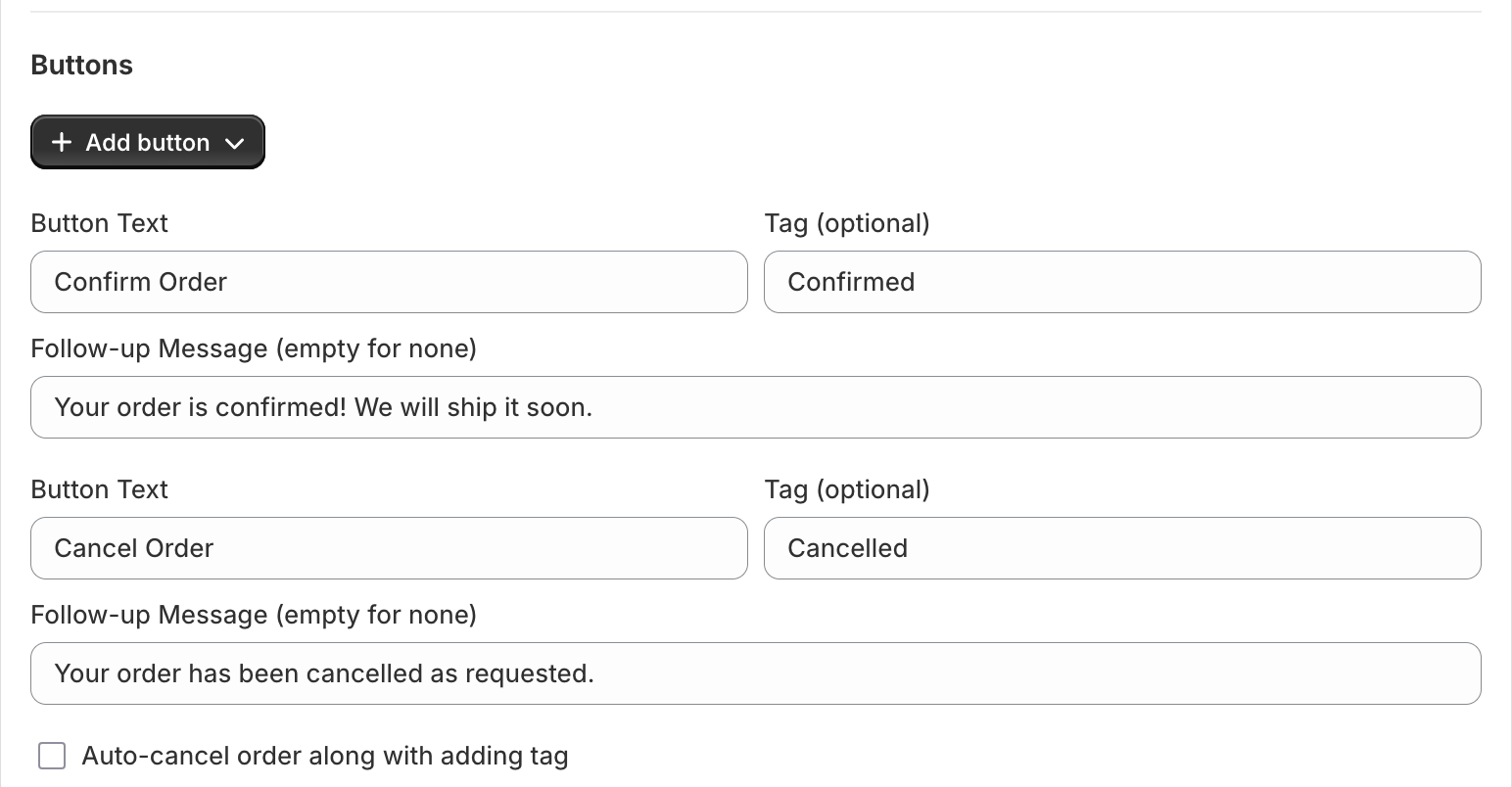
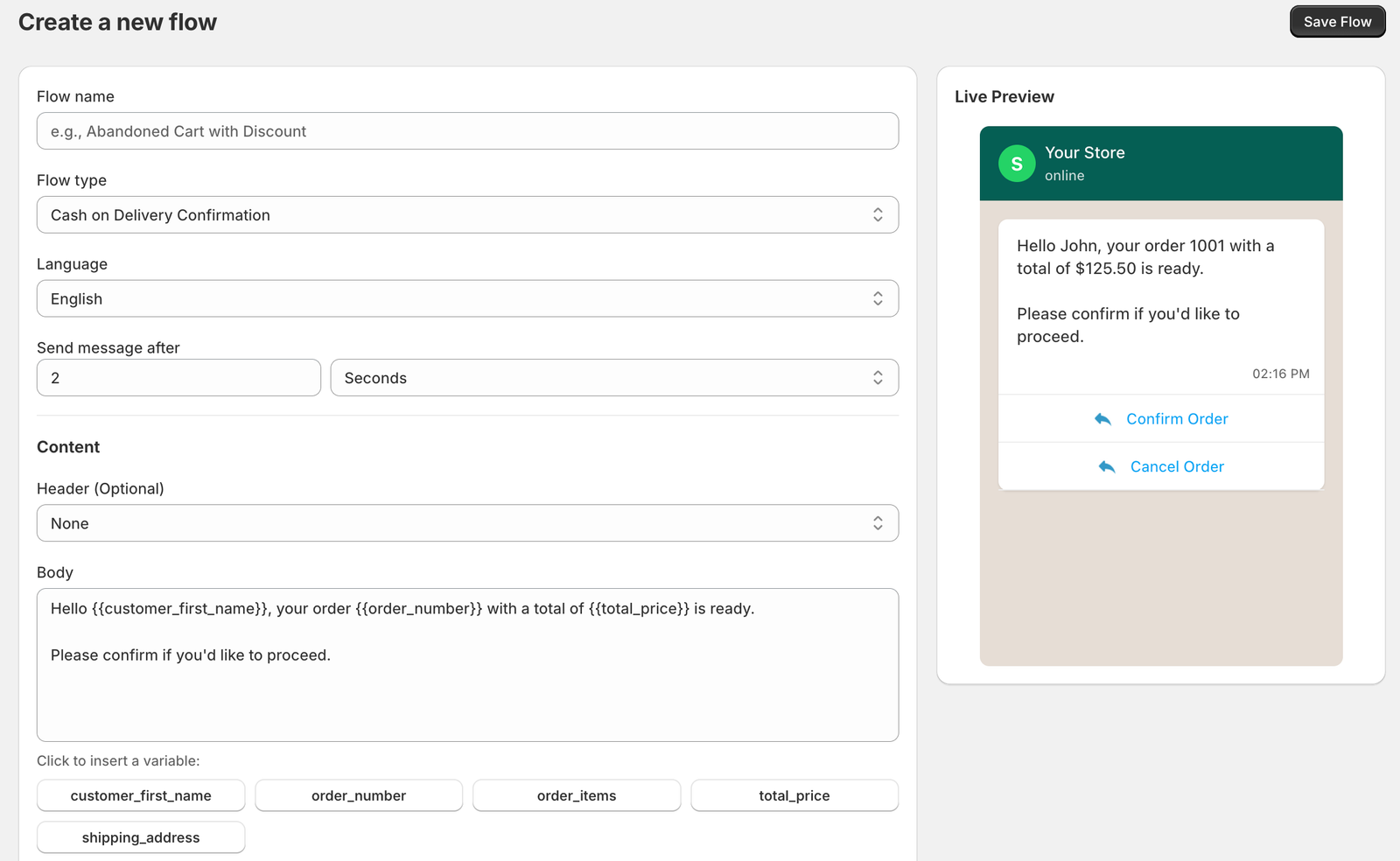
Choose the buttons, tags and follow-up messages

Set what each button does, which Shopify tag it adds and what the customer reads next, with a live preview of the exact WhatsApp message.

Whapi button settings: a Confirm Order button that adds the Confirmed tag and sends a follow-up message, a Cancel Order button that adds the Cancelled tag, and an option to auto-cancel the order in Shopify
Each button adds a Shopify tag, can send a follow-up message and can cancel the order.
Whapi flow builder with an order confirmation flow open: flow name, flow type, language, send delay and a message body using customer name, order number and total price variables, next to a live WhatsApp preview
The flow builder with Shopify variables and a live preview.
Which orders

Which orders to send a WhatsApp confirmation for

Most stores confirm every new order. A confirmation does the most for these.

OrdersWhy a confirmation helpsWhat the message should show
Every orderThe simplest setup: a receipt from your own number and one tap to confirm.Order number, items, total
High-value ordersA wrong address or size costs most here: return shipping and a second delivery.Sizes, variants, address
First-time buyersShows the order arrived and opens a chat for questions.Store name, next steps
Cross-border ordersShipping and returns between countries take longer and cost more.Full address, in their language
Invoice or manual paymentsPayment comes later, so a confirmed order is a clearer signal to pack.Total and payment method
Comparing channels? See WhatsApp vs SMS for order confirmation.
Cost

What a WhatsApp order confirmation costs: Meta’s Utility rate

Meta usually puts order confirmations in the Utility category and charges per delivered message by the customer’s phone country code, not your store’s market or currency. Whapi adds no markup. Rates for every country are on the WhatsApp API pricing page.

MarketUtility rate (USD)Utility on Meta’s EUR or GBP cardMarketing rate (USD), for comparison1,000 confirmations (USD)
Germany$0.0550€0.0456$0.1365$55.00
United Kingdom$0.0220£0.0159$0.0635$22.00
France$0.0300€0.0248$0.0859$30.00
United States$0.0034–$0.0250$3.40
Meta list rates per delivered message, rate card effective October 1, 2026, checked October 20, 2026. Utility rates drop as monthly volume grows. Since October 1, 2026, Utility templates are charged even inside the 24-hour customer service window. A dash means the rate isn’t listed here; Meta’s EUR and GBP cards also price the United States. Your Whapi plan is billed separately.
Templates

Order confirmation templates in English, German and French

Copy one into a Whapi flow and set the flow’s language. Meta decides the category when it reviews each template.

English template

Likely Utility

Hi {{customer_first_name}}, thanks for your order {{order_number}} from {{store_name}}. {{order_items}} Total: {{total_price}} Delivery address: {{shipping_address}} Please check the details and confirm so we can prepare your parcel.

Confirm Order
Cancel Order
When to send
A few minutes after the order is placed.
Meta category
Utility, most likely.

German template

Likely UtilityExample for native review

Hallo {{customer_first_name}}, vielen Dank für Ihre Bestellung {{order_number}} bei {{store_name}}. {{order_items}} Gesamt: {{total_price}} Lieferadresse: {{shipping_address}} Bitte prüfen Sie die Angaben und bestätigen Sie Ihre Bestellung, damit wir sie versenden können.

Bestellung bestätigen
Bestellung stornieren
When to send
A few minutes after the order is placed, in a flow set to German.
Meta category
Utility, most likely.

French template

Likely UtilityExample for native review

Bonjour {{customer_first_name}}, merci pour votre commande {{order_number}} chez {{store_name}}. {{order_items}} Total : {{total_price}} Adresse de livraison : {{shipping_address}} Merci de vérifier ces informations et de confirmer votre commande pour que nous puissions l’expédier.

Confirmer la commande
Annuler la commande
When to send
A few minutes after the order is placed, in a flow set to French.
Meta category
Utility, most likely.
GDPR and opt-in

Opt-in and GDPR for WhatsApp order updates

Meta requires an opt-in before any business-initiated WhatsApp message, order confirmations included: the customer must have given you their number and agreed to receive messages from your business.

Ask where you collect the number

Add a line next to the phone field at checkout that names your store and mentions order updates on WhatsApp. Your legal adviser can confirm which GDPR legal basis applies. See how Whapi handles GDPR and WhatsApp opt-in.

Keep marketing consent separate

Collect a separate marketing opt-in for campaigns and cart reminders, for example with the WhatsApp newsletter signup widget.

From the Shopify App Store

What stores using Whapi say

Rated 5 stars by 39 merchants on the Shopify App Store.

great customer support

K

Kopac

Romania · Shopify App Store review

Fast and easy. Good for simple automation and cart recovery. I was looking for a way to mass communicate to my audience without losing the personal touch and Whapi was a simple and great way to do that! Their support is very helpful and I was surprised when they implemented fixes to my issues. Definitely recommend for small businesses to use.

C

CaliChimps

Singapore · Shopify App Store review

WhatsApp order confirmation questions

How do I automatically send a WhatsApp order confirmation when a Shopify order is placed?

Install Whapi, a Shopify app for WhatsApp automation, connect your number through Meta’s official WhatsApp Business API and turn on the order confirmation flow. For each new order, Whapi waits for the delay you set, sends the customer a WhatsApp message with Confirm Order and Cancel Order buttons and tags the Shopify order with the answer.

What happens when the customer taps Confirm or Cancel?

Whapi adds the tag you chose for that button, for example Confirmed or Cancelled, to the Shopify order and sends the button’s follow-up message if you wrote one. With auto-cancel on, the Cancel button also cancels the order in Shopify.

What if the customer doesn't reply?

The order keeps an unconfirmed status, so it is easy to filter in Shopify. You can send a follow-up, contact the customer another way or hold the order.

Is a WhatsApp order confirmation a Utility or a Marketing message, and what does it cost?

Usually Utility, if it is about the customer's own order and contains no promotion. Meta decides when it reviews the template. On Meta's rate card effective October 1, 2026, a delivered Utility message costs $0.0550 in Germany, $0.0220 in the United Kingdom, $0.0300 in France and $0.0034 in the United States. Whapi adds no markup.

Do I need consent under GDPR to send order confirmations on WhatsApp?

You need an opt-in either way. Meta's WhatsApp Business Messaging Policy only allows a business to message people who gave it their number and agreed to receive WhatsApp messages from it, order confirmations included. Which GDPR legal basis applies to order messages is a question for your own legal adviser.

Can I send order confirmations in German, French or other languages?

Yes. You write the message and button labels and set the flow’s language, so a store selling mainly to Germany can confirm orders in German. Any language WhatsApp supports works.

Which Whapi plan includes WhatsApp order confirmation?

Both Pro ($18.99 per month or $149 per year) and Team ($45 per month or $299 per year) include order confirmation with automatic order tags and start with a 7-day free trial. Meta's message fees are paid to Meta separately.

Sources

  1. Meta: WhatsApp Business Platform pricing (checked October 20, 2026)
  2. Meta: Rate cards (USD, EUR and GBP list rates) (checked October 20, 2026)
  3. Meta: Template categorization (Utility and Marketing rules) (checked October 20, 2026)
  4. Meta: Getting opt-in for WhatsApp (checked October 20, 2026)
  5. WhatsApp Business Messaging Policy (checked October 20, 2026)

Confirm your next Shopify order on WhatsApp.

Join 5,000+ merchants using Whapi. Install it from the Shopify App Store, connect your WhatsApp Business number and turn on your first automation in minutes. Every plan starts with a 7-day free trial.