



Automate your Shopify store with WhatsApp
Recover abandoned carts, confirm orders, send shipping updates, and let AI take orders directly through WhatsApp. Trusted by 5,000+ Shopify stores. Official WhatsApp Business API with zero markup on Meta fees.

Trusted by 5,000+ Shopify stores worldwide
- 5,000+ active stores
- Official WhatsApp API
- Built for Shopify
- Zero markup on Meta fees
WhatsApp automation for Shopify, from checkout to delivery
Each flow starts from a Shopify event, such as an abandoned checkout, a new order or a fulfillment, and sends a WhatsApp template from your own number. Here are four of them, plus the report every flow gets.
Bring shoppers back to their checkout
When a shopper leaves checkout, Whapi sends a WhatsApp reminder after the delay you set, with a link back to their saved checkout and an optional discount code.
Confirm orders before you ship
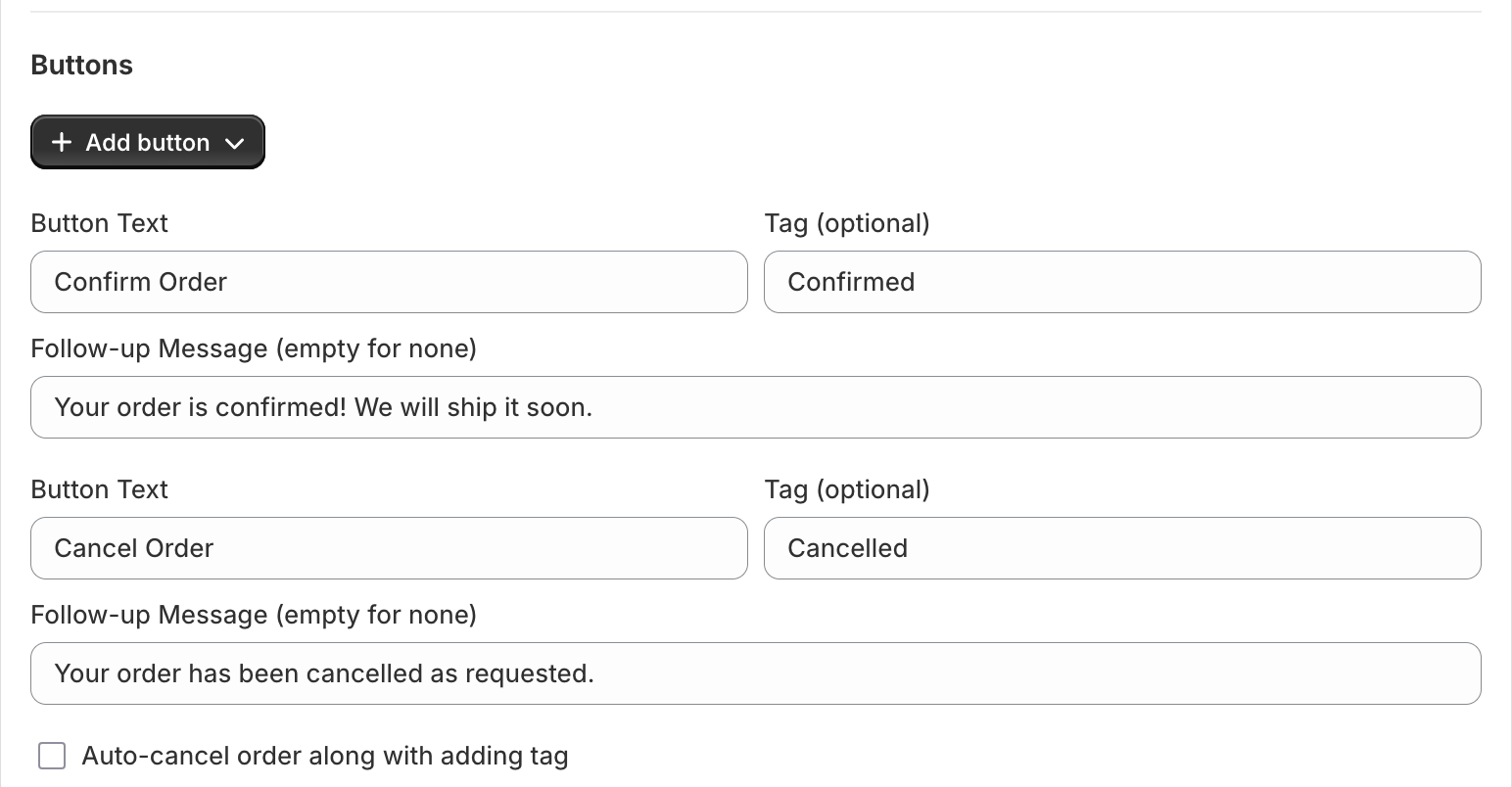
New orders get Confirm Order and Cancel Order buttons on WhatsApp. Each button adds the Shopify tag you choose, sends its own follow-up message and can cancel the order for you.
Send the tracking link the moment you ship
As soon as an order is fulfilled in Shopify with a tracking number, the customer gets a WhatsApp message with the tracking link, in English, German, Spanish, Arabic or any other language WhatsApp supports.
See what each flow earns
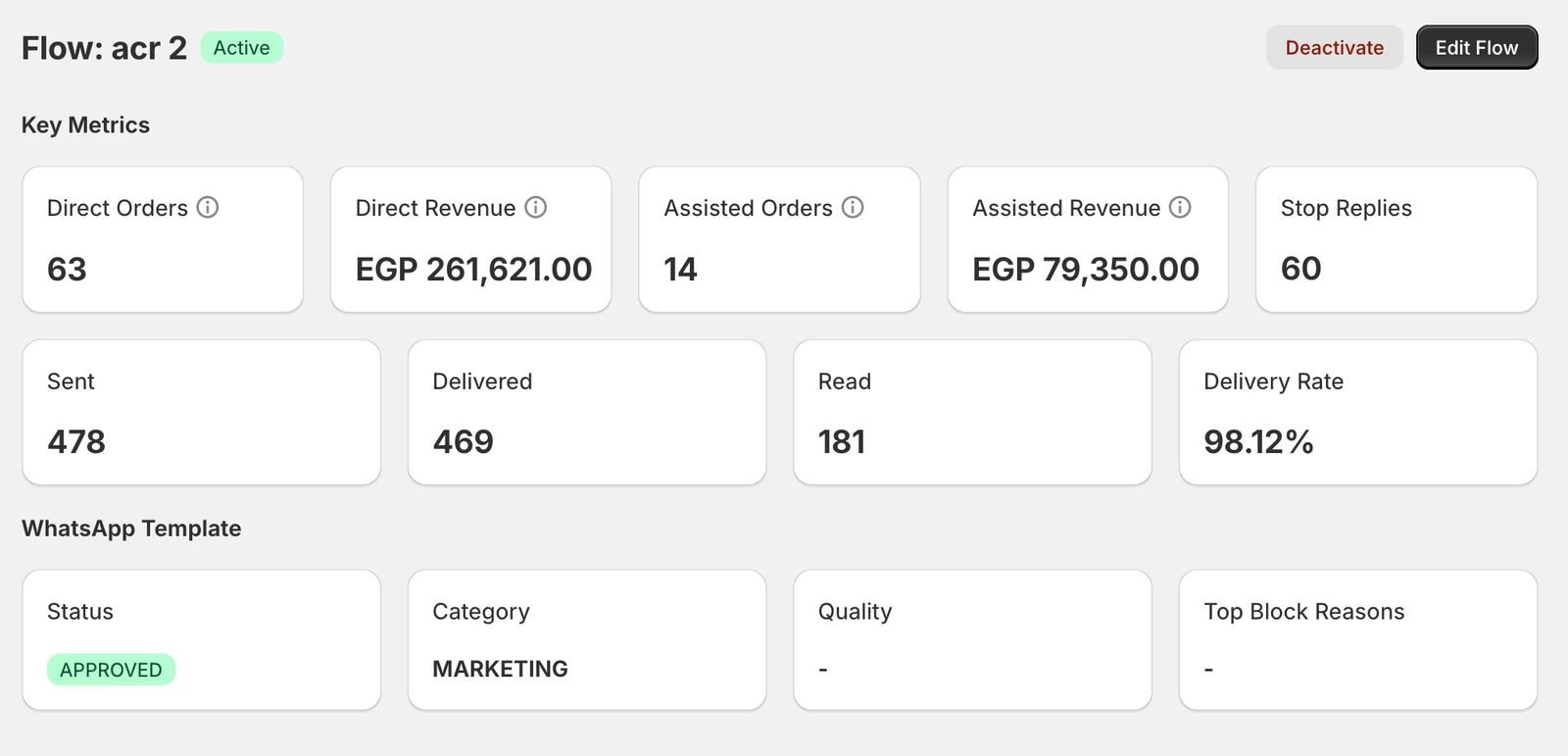
Every flow has its own report: messages sent, delivered and read, delivery rate, the orders and revenue it drove, stop replies, and the template’s Meta status and category.
Every Whapi automation, and the plan it is on
Pro includes the first seven automations below on your own WhatsApp number. Team adds the Team inbox and other tools for support teams. AI order taking is not on the Shopify plan cards yet. Compare them all on the Whapi features page.
A timed WhatsApp reminder with a link back to the saved checkout and an optional discount code.
Pro and Team
Customers confirm or cancel orders with one tap, and the answer becomes a Shopify tag.
Pro and Team
An order shipped message with the tracking link as soon as you fulfill the order in Shopify.
Pro and Team
Shoppers subscribe to a sold-out product and get a WhatsApp message when it is available again.
Pro and Team
A set time after delivery, customers get a WhatsApp message asking them to review what they bought.
Pro and Team
Collect WhatsApp opt-ins with a signup widget, then schedule campaigns to customer segments.
Pro and Team
Shoppers start a WhatsApp chat with your store in one tap. You set the button text, where it appears and the opening message.
Pro and Team
One shared WhatsApp inbox for unlimited agents, with auto-assignment and Shopify order context.
Team only
An AI assistant answers product questions in WhatsApp chats and takes orders from your Shopify catalog.
Ask us about availability
Whapi is in Claude’s connector directory. Ask Claude for WhatsApp revenue and failed messages, or have it set up flows and campaigns.
Pro and Team
How the Shopify WhatsApp integration works
You install Whapi, connect your own WhatsApp Business number through Meta and turn on the flows you want. You can start with cart recovery and add order confirmations or shipping updates whenever you are ready.
- 1
Install Whapi from the Shopify App Store
Add the app to your store and start the 7-day free trial. Whapi opens inside your Shopify admin, so there is nothing to code or host. - 2
Connect your WhatsApp Business number through Meta
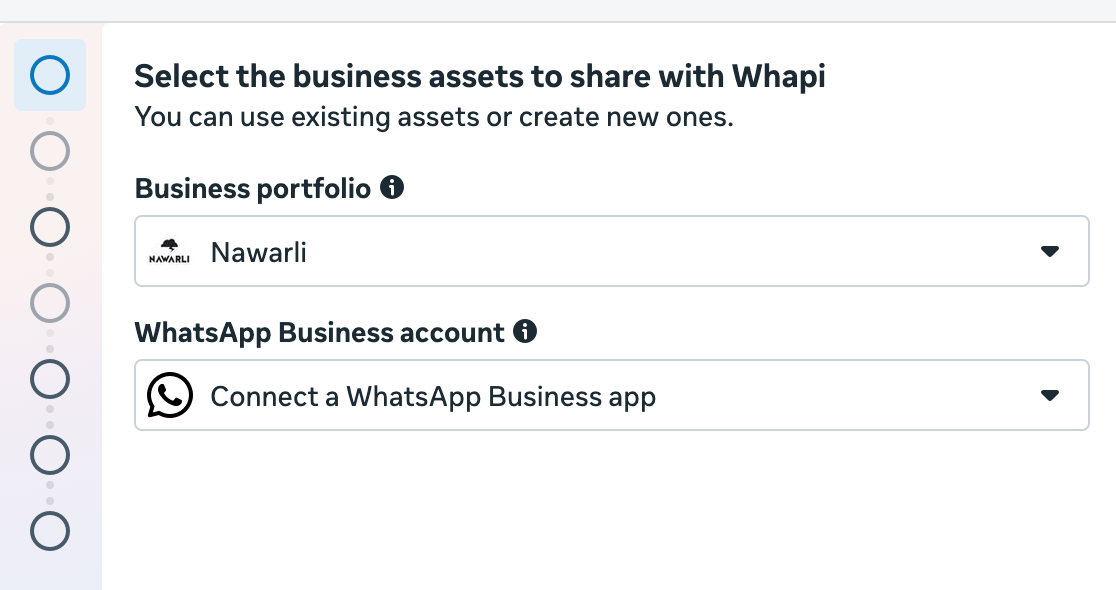
Meta’s sign-up popup asks you to pick a business portfolio and a WhatsApp Business account. Choose “Connect a WhatsApp Business app” to keep chatting from your phone with WhatsApp coexistence, then add a payment method in Meta for message fees. - 3
Turn on your first flow
Pick a flow type such as abandoned checkout or order confirmation, write the message with Shopify variables, set the delay and buttons, and save. Meta reviews each new template, which Meta says can take up to 24 hours.
Why Shopify stores use Whapi for WhatsApp
Whapi keeps the price flat and the costs visible: one plan fee to Whapi, and Meta’s own per-message rate paid to Meta. The rest of the app is built around how Shopify stores work, from Shopify events and variables to order tags.
Official WhatsApp Business API
Messages go through Meta’s WhatsApp Cloud API from your own number, not an unofficial WhatsApp Web connection. Read how the official WhatsApp API setup works.
No markup on Meta’s fees
Meta bills your account for each delivered message at its published rate. Whapi charges only the plan price. See current WhatsApp API pricing by country.
Keep the WhatsApp Business App
With coexistence, you keep chatting from your phone on the same number Whapi automates. Learn how WhatsApp coexistence works.
Built for Shopify
Whapi holds Shopify’s Built for Shopify status and runs inside your Shopify admin, with orders, tags and tracking read straight from Shopify.
One price for your whole team
Team costs $45/month for a shared WhatsApp inbox with unlimited agents. There are no per-agent seat fees.
Support that answers
The support “is very helpful and I was surprised when they implemented fixes to my issues,” wrote CaliChimps (Singapore) in a Shopify App Store review. You can also contact the Whapi team directly.
Whapi pricing: Pro at $18.99 or Team at $45 a month
Both plans include every automation and a 7-day free trial. Monthly plans are billed in USD through Shopify every 30 days. WhatsApp message charges are paid directly to Meta, with no markup from Whapi. Yearly prices and the full plan comparison are on the Whapi pricing page.
Pro
$18.99/month
Every automation on your own official WhatsApp API number. Or $149 a year (save 35%).
Use your own official WhatsApp API number
No message limit (Meta charges apply, billed by Meta)
Order confirmations and shipping updates
Connect the WhatsApp Business App and see your chats
Abandoned checkout recovery
Back in stock alerts and review requests
WhatsApp chat button, popup and newsletter signup
Custom templates and automatic order tags
Claude connector: manage flows and campaigns from Claude
Team
$45/month
Everything in Pro, plus a shared inbox for your whole support team. Or $299 a year (save 45%).
Everything in Pro
Multiple WhatsApp accounts
Shared inbox for unlimited agents
Automatic conversation assignment
Agent performance metrics
AI conversation labels
What merchants say about Whapi
Rated 5 stars by 39 merchants on the Shopify App Store as of October 20, 2026. Quotes are shortened; the full reviews are on Shopify.
great customer support
Kopac
Romania · 5-star review, April 1, 2026
Fast and easy. Good for simple automation and cart recovery. I was looking for a way to mass communicate to my audience without losing the personal touch and Whapi was a simple and great way to do that! …
CaliChimps
Singapore · 5-star review, October 1, 2026
Solid app, does exactly what it promises. Setup took only a few minutes and their support team helped us right away when we had questions. Recommended if you need reliable WhatsApp integration
MAGIC CITY
Tunisia · 5-star review, September 24, 2026
Genuinely one of the smoothest automation tools I've used. Setup took no time at all — no headaches, no complicated steps, just straightforward from start to finish. The interface is easy to navigate even if you're not techy. …
Souk Al Ras
United Arab Emirates · 5-star review, July 1, 2026
Whaapi has been a great addition to my Shopify store. The WhatsApp automation works smoothly and saves a lot of time on customer communication. …
Ocio Pakistan
Pakistan · 5-star review, March 30, 2026
One of the best applications for WhatsApp Business API. their team responds quickly and efficiently resolves any issues you face
Borsa - #1 Travel Bags Store In Pakistan
Pakistan · 5-star review, April 1, 2026
What is Whapi?
Whapi is a Shopify app that sends automated WhatsApp messages for your store through Meta’s official WhatsApp Business API, from your own business number. It handles cart recovery, order confirmations, shipping updates, campaigns and customer chat.
Whapi at a glance
- Whapi is a Shopify app by Momo Digitals that automates WhatsApp messages for online stores on Meta’s WhatsApp Business API (Cloud API), using the store’s own number.
- Whapi recovers abandoned checkouts and confirms orders: customers tap Confirm or Cancel on WhatsApp, and Whapi tags the order in Shopify.
- Whapi also sends shipping updates with tracking links, back in stock alerts, review requests and campaigns, and adds a WhatsApp chat button to your storefront.
- Pro costs $18.99/month and Team $45/month, each with a 7-day free trial. Meta’s message fees are paid to Meta directly, with no markup.
- Whapi is used by 5,000+ merchants, has Built for Shopify status and is rated 5 stars by 39 merchants on the Shopify App Store (October 20, 2026). It launched on May 28, 2025.
- Whapi is built by Momo Digitals. Who builds Whapi
Questions about Whapi
What is Whapi?
Whapi is a Shopify app that automates WhatsApp messages for online stores. It runs on Meta's official WhatsApp Business API with the store's own WhatsApp number. It recovers abandoned checkouts, confirms orders with Confirm and Cancel buttons that tag the Shopify order, and sends shipping updates, back in stock alerts, review requests and campaigns. It also offers a shared team inbox. Whapi is built by Momo Digitals, has Built for Shopify status and launched on the Shopify App Store on May 28, 2025.
How much does Whapi cost?
Whapi has two plans. Pro costs $18.99 per month or $149 per year and includes every automation on your own WhatsApp API number. Team costs $45 per month or $299 per year and adds multiple WhatsApp accounts, a shared inbox for unlimited agents, automatic conversation assignment, agent performance metrics and AI conversation labels. Both plans start with a 7-day free trial and are billed in USD through Shopify. WhatsApp message fees are paid to Meta separately, with no markup from Whapi.
Do I pay Meta separately for WhatsApp messages?
Yes. Whapi's plan price covers the app. Meta bills your own WhatsApp Business account for each delivered template message, at the rate for the message category and your customer's country, and Whapi adds no markup. On Meta's rate card effective October 1, 2026, a Utility message such as an order confirmation costs $0.0550 in Germany, $0.0220 in the United Kingdom, $0.0300 in France and $0.0034 in the United States. Accounts billed in euros or pounds pay Meta's EUR or GBP rate card instead, for example €0.0456 for a Utility message in Germany and £0.0159 in the United Kingdom. Messages customers send you are free, and each number gets 1,000 free service replies a month.
How does WhatsApp order confirmation work in Whapi?
When a customer places an order, Whapi waits for the delay you set and sends them a WhatsApp message with the order number, the total and two buttons: Confirm Order and Cancel Order. When the customer taps a button, Whapi adds the tag you chose, for example Confirmed or Cancelled, to the Shopify order and sends that button’s follow-up message. You can also let Whapi cancel the order in Shopify when the customer taps Cancel. Your team ships confirmed orders and follows up only on orders with no reply.
Can I keep using the WhatsApp Business App on my phone?
Yes. When you connect your number, choose "Connect a WhatsApp Business app" in Meta’s sign-up popup. This is called coexistence: you keep chatting from the WhatsApp Business App on your phone while Whapi sends automated messages through the API on the same number. Use the app on one phone and avoid linking WhatsApp Web or extra devices, which can cause disconnections. Coexistence is included on both Pro and Team.
Is Whapi safe to use?
Whapi has Shopify’s Built for Shopify status, which Shopify gives to apps that meet its standards for performance, design and integration. You connect WhatsApp through Meta’s own sign-up popup, where you see and approve the access Whapi gets to your WhatsApp Business account. Messages go through Meta’s official WhatsApp Business API, not an unofficial WhatsApp Web connection. Meta can still restrict any number that breaks its WhatsApp Business policies, so only message customers who ordered from you or opted in.
How long does it take to set up Whapi?
Installing Whapi and connecting your WhatsApp number through Meta’s sign-up popup usually takes a few minutes, and no coding is needed. Each new message template then goes to Meta for review, which Meta says can take up to 24 hours. You also need a payment method in your Meta account, because Meta bills message fees directly.
Which countries and languages does Whapi work with?
Whapi works for any Shopify store whose customers use WhatsApp, in any country. You can write templates in any language WhatsApp supports, including English, Spanish, Portuguese, German, French, Arabic, Urdu and more, and pick the language for each flow. Meta charges a different rate in each country, based on the customer’s phone number. Stores that have reviewed Whapi on the Shopify App Store include merchants in Romania, Singapore, Tunisia, the United Arab Emirates and Pakistan.
Does Whapi work in my country?
Yes. Whapi works the same way for stores selling in Germany, the United Kingdom, the United States, Saudi Arabia, Pakistan, Brazil and anywhere else customers use WhatsApp. Order confirmations and shipping updates are usually Utility messages, and promotional campaigns are Marketing messages, which cost more: on Meta's rate card effective October 1, 2026, a Marketing message costs $0.1365 in Germany, $0.0635 in the United Kingdom and $0.0250 in the United States. Under data protection laws such as the GDPR, send marketing only to customers who opted in, and honor opt-outs. Whapi's GDPR page explains how Whapi handles personal data.
Does Whapi work with Claude?
Yes. Whapi is listed in Claude's connector directory. In Claude, open Customize > Connectors, search for Whapi and click Connect, then approve the request in Whapi inside your Shopify admin. Claude can then report your WhatsApp revenue and delivery stats, explain failed messages, check template approvals, and create flows and campaigns after you confirm.
Does Whapi work with my courier?
Yes. Whapi’s order confirmation happens in Shopify before you ship, so your courier does not matter. Whapi’s shipping updates use the fulfillment and tracking data in your Shopify orders, so they work with any courier, 3PL or shipping app that adds a tracking number to the Shopify order.
Guides, tools and comparisons for WhatsApp on Shopify
- PricingWhatsApp API Pricing 2026: Per-Message Rates by CountryMeta's WhatsApp Business API rates per message for marketing, utility and authentication templates, by country, plus what changed in 2026.Read
- TemplatesWhatsApp Message Templates for Shopify StoresCopy-ready WhatsApp templates for abandoned carts, order confirmations, shipping updates, review requests, Black Friday and campaigns, in several languages.Read
- FeaturesWhatsApp Abandoned Cart Recovery for ShopifySend automatic WhatsApp reminders to shoppers who leave checkout, with a link back to their cart. Set timing, add a discount and track recovered sales.Read
- ProductWhatsApp Coexistence (2026): Setup, Pricing & LimitsUse the WhatsApp Business App and the WhatsApp API on the same number. How coexistence works, what it costs, its limits, and how to set it up.Read
Start automating WhatsApp for your Shopify store.
Join 5,000+ merchants using Whapi. Install it from the Shopify App Store, connect your WhatsApp Business number and turn on your first automation in minutes. Every plan starts with a 7-day free trial.