Recover Shopify abandoned checkouts on WhatsApp
Whapi, a Shopify app for WhatsApp automation, handles WhatsApp abandoned cart recovery for you. When a shopper leaves checkout, they get a WhatsApp reminder with their cart and a link straight back to it. You choose when it goes out and whether it carries a discount code.
Used by 5,000+ merchantsRated 5 stars by 39 merchants7-day free trialBuilt for Shopify
The short answer
- Whapi sends shoppers who leave your Shopify checkout a WhatsApp reminder with a link back to their checkout.
- You set the delay, the message text and language, and whether a reminder includes a discount code.
- Shopify counts a checkout as abandoned after it has been incomplete for more than ten minutes. Whapi can only message checkouts that include a phone number.
- Meta charges cart reminders as Marketing messages: $0.1365 per delivered message in Germany and $0.0635 in the United Kingdom (rate card effective October 1, 2026). You pay Meta directly, with no markup from Whapi.
- Included in Pro ($18.99/month) and Team ($45/month), with a 7-day free trial.
How WhatsApp abandoned cart recovery works in Whapi
Whapi watches your store’s abandoned checkouts and sends the reminder for you. There’s no list to export and no campaign to schedule. Copy-ready wording for each reminder is on the abandoned cart WhatsApp message templates page.
- 1
A shopper starts checkout and leaves
They enter their contact details at your Shopify checkout but don’t pay. Shopify records the checkout as abandoned once it has been incomplete for more than ten minutes. - 2
Whapi waits for the delay you set
You choose the delay in the flow, for example one hour. Whapi can only message checkouts that include a phone number, so make sure your checkout asks for one. - 3
The shopper gets a WhatsApp reminder
The message shows what they left and links straight back to their checkout. You can add a discount code to this reminder or keep it for a follow-up. - 4
You see the orders it brings back
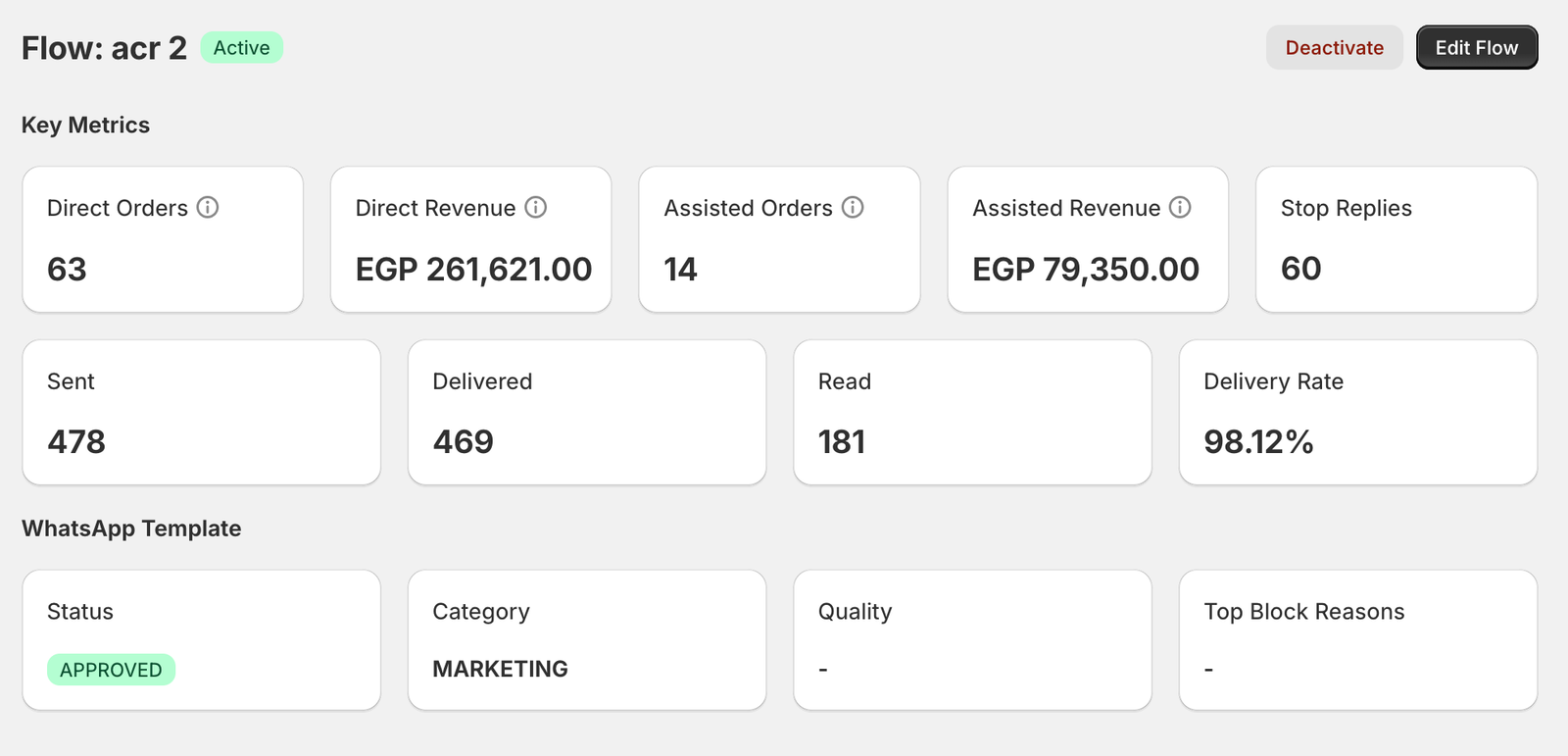
Each flow has its own analytics: orders and revenue attributed to the flow, messages sent, delivered and read, and how many customers replied Stop.
When to send each reminder, and when to offer a discount
A simple starting plan is a first reminder about an hour after the checkout is abandoned and a follow-up about a day later, with any discount saved for the follow-up. Then adjust the delays based on your flow analytics.
| Reminder | Send after | What it says | Discount |
|---|---|---|---|
| First reminder | About 1 hour after the checkout is abandoned | What they left, the total and a link back to checkout | None |
| Follow-up | About 24 hours later | A short nudge that answers the usual doubts, such as delivery time or payment options | Optional, for example 10% off |
Build the reminder and track what it recovers
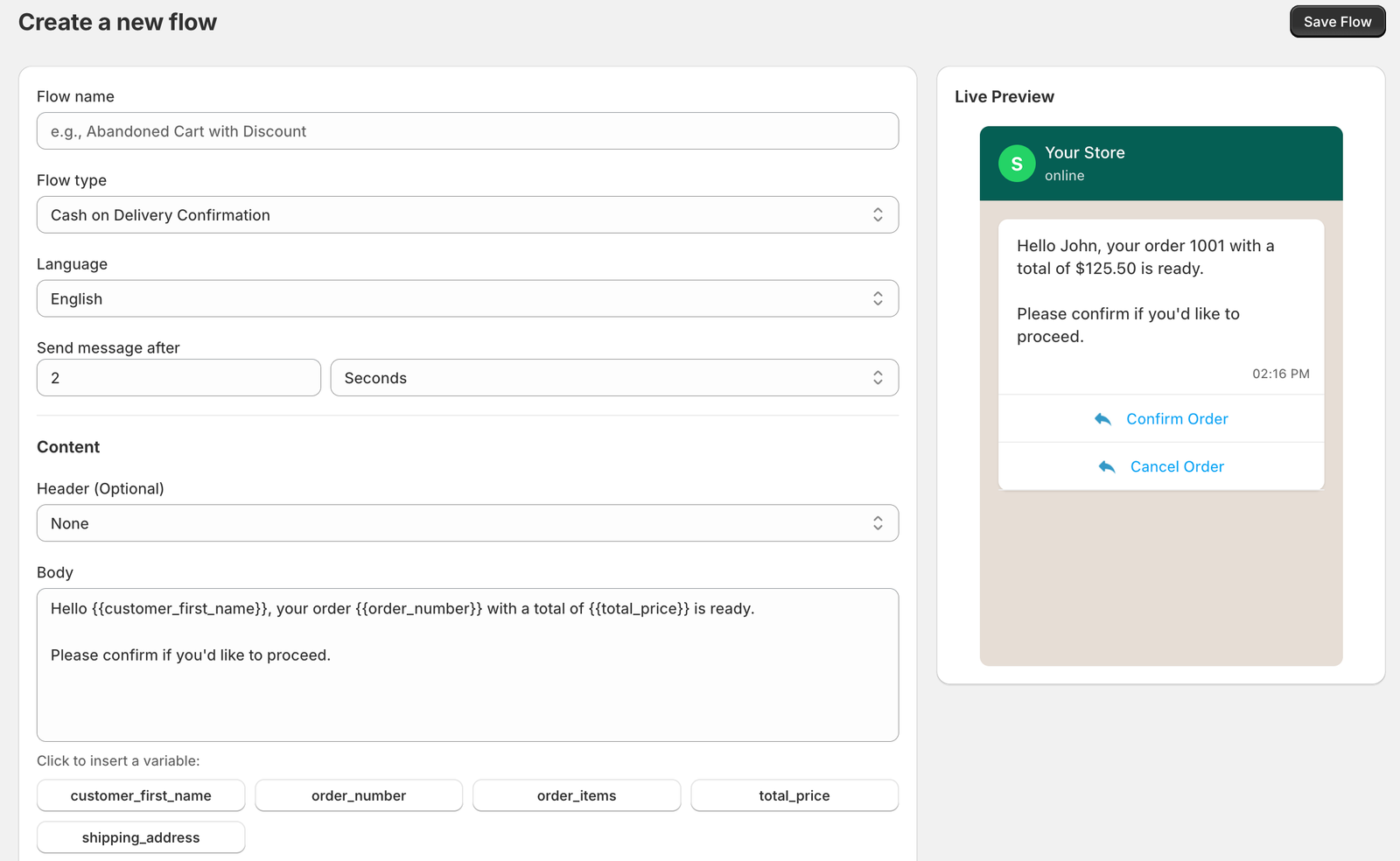
Every automation in Whapi is a flow: a message, a language, a delay and a live WhatsApp preview. Once it runs, the same flow shows the orders and revenue it brought back.
Everything in the reminder is yours to change
You write the message, decide whether it carries a discount, and answer the replies it brings in.
Discount codes
Add a percentage or fixed-amount code, and choose which reminder carries it.
Wording and language
Write in English, German, Spanish, Portuguese, Arabic or any other language WhatsApp supports, in your own tone.
Replies in your chats
Questions about size, delivery or payment come back to your number, where you or the Team Inbox can answer them.
What WhatsApp cart reminders cost: Meta’s Marketing rates
Each delivered cart reminder costs Meta’s Marketing rate for the customer’s country, because Meta treats cart reminders as retargeting even when the shopper asked for them. Whapi adds no markup. Rates for every country are on the WhatsApp API pricing page.
| Market | Marketing rate per delivered message | 100 delivered reminders |
|---|---|---|
| Germany | $0.1365 | $13.65 |
| United Kingdom | $0.0635 | $6.35 |
| France | $0.0859 | $8.59 |
| United States and Canada (North America) | $0.0250 | $2.50 |
| Brazil | $0.0625 | $6.25 |
| Mexico | $0.0397 | $3.97 |
| United Arab Emirates | $0.0576 | $5.76 |
| Saudi Arabia | $0.0576 | $5.76 |
| Pakistan | $0.0473 | $4.73 |
| South Africa | $0.0379 | $3.79 |
Opt-in and Meta’s marketing message rules
Because cart reminders are Marketing messages, two Meta rules decide who receives them and how often.
Get opt-in where you collect the number
The opt-in must name your business and say the shopper will get WhatsApp messages from it. Add that line where shoppers enter their phone number, or collect numbers with the WhatsApp newsletter signup widget. Customers who reply Stop are counted in your flow analytics. If GDPR applies to your shoppers, see how Whapi handles GDPR and WhatsApp opt-in.
Expect Meta’s per-user marketing limit
Meta caps how many marketing messages a person receives from businesses when they are less likely to engage. A blocked reminder fails with WhatsApp error 131049. Meta charges only for delivered messages, so a blocked reminder costs nothing.
Shopify’s abandoned checkout email vs a WhatsApp reminder
Whapi doesn’t replace Shopify’s abandoned checkout email, and you can run both. The email needs an email address and the WhatsApp reminder needs a phone number, so together they reach shoppers that either one alone would miss.
| Shopify abandoned checkout email | WhatsApp reminder with Whapi | |
|---|---|---|
| Contact it needs | An email address | A phone number on WhatsApp |
| Checkouts with a phone number but no email | Can’t be reached: Shopify can’t send the recovery email | Reached on WhatsApp |
| Link back to the checkout | Yes | Yes |
| Customer can ask a question | By replying to an email | In the same WhatsApp chat, answered by your team |
| Where it lands | The customer’s email inbox | The customer’s WhatsApp chats |
What stores using Whapi say
Rated 5 stars by 39 merchants on the Shopify App Store.
Fast and easy. Good for simple automation and cart recovery. I was looking for a way to mass communicate to my audience without losing the personal touch and Whapi was a simple and great way to do that! …
CaliChimps
Singapore · Shopify App Store review
great customer support
Kopac
Romania · Shopify App Store review
Genuinely one of the smoothest automation tools I've used. Setup took no time at all — no headaches, no complicated steps, just straightforward from start to finish. The interface is easy to navigate even if you're not techy. …
Souk Al Ras
United Arab Emirates · Shopify App Store review
Abandoned cart recovery questions
How does WhatsApp abandoned cart recovery work on Shopify?
When a shopper enters their details at your Shopify checkout and leaves without paying, Shopify records an abandoned checkout. Whapi, a Shopify app for WhatsApp automation, waits for the delay you set and then sends the shopper a WhatsApp message with what they left and a link back to their checkout. If they complete the order, it shows up in the flow analytics in Whapi.
How long after a checkout is abandoned should the WhatsApp reminder go out?
Shopify counts a checkout as abandoned once it has been incomplete for more than ten minutes, so the reminder should go out after that. In Whapi you set the delay yourself. A simple starting point is about an hour, with a follow-up the next day.
Can I add a discount code to an abandoned cart WhatsApp message?
Yes. Whapi lets you add a discount code to an abandoned cart reminder and choose the discount type (percentage or fixed amount), the code and which reminder carries it. You can keep the first reminder discount-free and offer the code only in the follow-up.
Is an abandoned cart reminder a marketing or a utility message on WhatsApp?
Marketing. Meta's template guidelines list cart reminders such as "You left {{items}} in your cart!" as retargeting, and say these messages are marketing even if the user asked for them. Meta can also move a template to the Marketing category on its own if it was submitted as Utility but doesn't follow the guidelines.
How much does each abandoned cart WhatsApp message cost?
Meta charges the Marketing rate for the customer's country, per delivered message. On Meta's rate card effective October 1, 2026, that is $0.1365 in Germany, $0.0635 in the United Kingdom, $0.0859 in France and $0.0250 in the United States. You pay Meta directly, with no markup from Whapi, on top of your Whapi plan.
Do I need customer opt-in to send abandoned cart messages on WhatsApp?
Yes. Meta requires opt-in before a business messages someone on WhatsApp, and the opt-in must name your business and say the person will get messages from it. Collect it where shoppers enter their phone number, such as at checkout or in Whapi's WhatsApp newsletter signup widget.
Why didn't a shopper get the abandoned cart reminder?
Check three things first: the checkout may have no phone number, so there is no one to message; the delay you set may not have passed yet; or Meta's per-user marketing limit may have blocked the message, which shows as error 131049. Meta doesn't charge for messages it doesn't deliver.
Which Whapi plan includes abandoned cart recovery?
Abandoned checkout recovery is included in both the Pro plan ($18.99 per month or $149 per year) and the Team plan ($45 per month or $299 per year). Both start with a 7-day free trial, and WhatsApp message fees are paid to Meta separately.
Sources
- Meta: Template categorization (Marketing and Utility rules) (checked October 20, 2026)
- Meta: WhatsApp Business Platform pricing and rate cards (checked October 20, 2026)
- Meta: Getting opt-in for WhatsApp (checked October 20, 2026)
- Meta: Per-user marketing template message limits (checked October 20, 2026)
- Shopify Help Center: Abandoned checkouts (checked October 20, 2026)
Keep reading
- TemplatesAbandoned Cart WhatsApp Message Templates (Shopify)Abandoned checkout WhatsApp templates for a first reminder, a follow-up and a discount offer, with timing advice and Shopify variables.Read
- TemplatesWhatsApp Utility vs Marketing Templates: Rules & CostHow Meta decides if a WhatsApp template is utility, marketing or authentication, why it matters for cost, and how to avoid recategorization.Read
- PricingWhatsApp API Pricing 2026: Per-Message Rates by CountryMeta's WhatsApp Business API rates per message for marketing, utility and authentication templates, by country, plus what changed in 2026.Read
Send your first WhatsApp cart reminder today.
Join 5,000+ merchants using Whapi. Install it from the Shopify App Store, connect your WhatsApp Business number and turn on your first automation in minutes. Every plan starts with a 7-day free trial.