WhatsApp utility vs marketing templates: how Meta decides and what it costs
Meta puts every WhatsApp template into one category: Utility for messages about a customer’s own order or account, Marketing for anything promotional, and Authentication for one-time codes. The category sets the price of each message and the delivery rules it follows.
In Germany, a delivered marketing message costs $0.1365 and a utility message $0.0550. Here is how Meta draws the line, with Shopify examples.
Used by 5,000+ merchantsRated 5 stars by 39 merchants7-day free trialBuilt for Shopify
By the Whapi teamUpdated
The short answer
- Meta has three WhatsApp template categories: Marketing, Utility and Authentication. Free-form replies sent inside the 24-hour customer service window are Service messages.
- A template is Utility only if it is non-promotional and is about the customer’s own order, account or request, or is essential to them, such as a product recall. Mixed or unclear content is Marketing.
- Since April 9, 2025, Meta approves a template submitted as Utility as Marketing if its content is marketing. Meta can also move an approved template to Marketing later, normally with 1 day’s notice.
- Marketing costs more than Utility in every market on Meta’s rate card effective October 1, 2026: from 2.5× to 9.2× in the markets compared below.
- Abandoned cart reminders (retargeting) and greetings such as Christmas wishes (relationship building) are Marketing under Meta’s guidelines. An order confirmation with no offer is Utility.
The three WhatsApp template categories
Meta sorts WhatsApp message templates into Marketing, Utility and Authentication, and charges each delivered template at the rate for its category and the customer’s country. A business can only start a conversation with a template, so every automated message a Shopify store sends first, such as an order confirmation or a sale announcement, falls into one of these categories.
| Category | What Meta says it is for | Shopify examples | Germany | United Kingdom |
|---|---|---|---|---|
| Marketing | Awareness, sales, retargeting, app promotion and building customer relationships. Also any template with mixed or unclear content. | Sale announcements, new arrivals, abandoned cart reminders, back in stock alerts, product review requests, win-back offers, Black Friday offers, holiday greetings | $0.1365 | $0.0635 |
| Utility | Following up on a user action or request (an order, account or transaction), or essential alerts. | Order confirmation, shipping update, order-specific feedback request, opt-in confirmation | $0.0550 | $0.0220 |
| Authentication | One-time passcodes that let a user verify their identity. | Login or verification codes | $0.0550 | $0.0220 |
| Service (not a template) | Free-form replies while the 24-hour customer service window is open. | Answering a customer’s question in your inbox | 1,000 free per number each month, then the utility rate | 1,000 free per number each month, then the utility rate |
For a Shopify store, the split matters most for two kinds of automation: order confirmations and shipping updates, which are utility when written well, and abandoned cart reminders and campaigns, which are always marketing.
The two-part test for a utility template
A template is utility only when it passes both parts of Meta’s test. If either part fails, Meta categorizes it as marketing.
- It is non-promotional. It has no promotional or persuasive intent. For order and account messages, Meta says they should not promote, recommend, upsell or cross-sell products, include offers, or try to secure renewals.
- It is specific to the user, or essential to them. It is clearly about the user’s own order, account, service or transaction, or it was requested by the user. The alternative is a message that is essential or critical, such as a product recall, a warranty alert or a privacy policy update.
Meta adds three rules that catch many store templates:
- Mixed content is marketing. Meta’s examples are “an order update with a promo” and “a feedback survey with promotional content”.
- Unclear content is marketing. A template whose whole body is a variable, or just “Congratulations!”, can’t be judged, so it is marketing.
- Generic feedback is marketing. Meta says a general or generic survey or request for feedback will not be approved as utility. The request must name the order or interaction it is about.
WhatsApp utility vs marketing template wording for Shopify stores
The same message can be utility or marketing depending on one sentence. The utility versions below stay on the customer’s order; the marketing versions add the line that tips them over.
| Message | Utility wording | What makes it marketing |
|---|---|---|
| Order confirmation | Hi {{customer_first_name}}, please confirm your order {{order_number}} for {{total_price}} so we can ship it. | Adding “Use code THANKS10 for 10% off your next order.” |
| Shipping update | Your order {{order_number}} has shipped. Track it here: {{tracking_url}} | Adding “While you wait, see our new arrivals.” |
| Delivery delay | Your order {{order_number}} is delayed. The new delivery date is [date]. | Adding a credit for the delay. Meta’s own example of a delivery delay message with a credit is marketing (retargeting). |
| Feedback request | We delivered your order {{order_number}}. Please let us know if there was any issue. | A generic “Rate our store!” with no order, or a discount for leaving a review. |
| Opt-in confirmation | Thanks for confirming. You’ll now get updates about your orders on WhatsApp. | Adding a welcome discount for the first order. |
| Abandoned checkout | No utility version. Meta counts it as retargeting. | “You left items in your cart” is marketing even if the customer asked for reminders. |
| Christmas delivery | Your order {{order_number}} will arrive before Christmas. Expected delivery: [date]. | “Order by December 17 to get your gifts before Christmas”, sent to your whole list, is marketing. |
| Holiday greeting | No utility version. It isn’t about an order. | “Merry Christmas from [store name]!” |
You can copy full versions of these from the shipping update templates. Whapi sends review requests and back in stock alerts as Marketing templates, charged at Meta’s Marketing rate. Promotional messages belong in a separate template sent only to customers who opted in, like the ones on the WhatsApp marketing templates page.
How much more marketing templates cost
A marketing message costs more than a utility message in every market on Meta’s rate card effective October 1, 2026. The gap ranges from 2.5× to 9.2× in the markets below, and Brazil has the widest gap.
| Market | Marketing | Utility | Per 1,000 messages | Marketing costs |
|---|---|---|---|---|
| Germany | $0.1365 | $0.0550 | $136.50 vs $55.00 | 2.5× |
| United Kingdom | $0.0635 | $0.0220 | $63.50 vs $22.00 | 2.9× |
| France | $0.0859 | $0.0300 | $85.90 vs $30.00 | 2.9× |
| Italy | $0.0795 | $0.0300 | $79.50 vs $30.00 | 2.7× |
| Spain | $0.0707 | $0.0200 | $70.70 vs $20.00 | 3.5× |
| Netherlands | $0.1597 | $0.0500 | $159.70 vs $50.00 | 3.2× |
| Poland | $0.0366 | $0.0122 | $36.60 vs $12.20 | 3.0× |
| Romania | $0.0860 | $0.0290 | $86.00 vs $29.00 | 3.0× |
| Rest of Western Europe | $0.0592 | $0.0171 | $59.20 vs $17.10 | 3.5× |
| North America | $0.0250 | $0.0034 | $25.00 vs $3.40 | 7.4× |
| Brazil | $0.0625 | $0.0068 | $62.50 vs $6.80 | 9.2× |
| Saudi Arabia | $0.0576 | $0.0107 | $57.60 vs $10.70 | 5.4× |
| United Arab Emirates | $0.0576 | $0.0157 | $57.60 vs $15.70 | 3.7× |
| Pakistan | $0.0473 | $0.0150 | $47.30 vs $15.00 | 3.2× |
For a store that sends 3,000 order confirmations a month to customers in Germany, that is $165.00 at the utility list rate. If Meta moved the same template to marketing, those 3,000 messages would cost $409.50. In the United Kingdom the same volume is $66.00 as utility and $190.50 as marketing.
Three pricing rules widen the gap:
- Only utility and authentication get volume tiers. Their rates drop in steps as monthly volume grows, down to 25% below the list rate. Marketing has no volume tiers.
- Utility inside the service window is charged since October 1, 2026. Before that date a utility template sent while the customer service window was open was free. Read what changed in Meta’s October 2026 pricing.
- Click to WhatsApp ads remove the gap for a week. When a customer writes to you from a Click to WhatsApp ad on the WhatsApp phone app and you reply within the service window, a free entry point window of up to 7 days opens. Marketing, utility, authentication and service messages to that customer are all free while it is open.
How Meta assigns a category when you submit a template
You pick a category when you create a template, and Meta checks it against the content and its guidelines. The template then gets one of three statuses:
- Approved: Meta agrees with the category and the template passed review. It can be sent.
- Pending: Meta agrees with the category, but the template is still in review. Meta says review can take up to 24 hours.
- Rejected: Meta disagrees with the category. The webhook reason is
INCORRECT_CATEGORY. You can create a new template, edit the category and resubmit, or request a review.
Since April 9, 2025, a template submitted as Utility whose content Meta reads as Marketing is approved as Marketing instead of being rejected. This used to need the allow_category_change setting; it is now the default. You can request a review up to 60 days after the template was created or its category was updated. If a template is rejected for other reasons, such as formatting, see why WhatsApp templates get rejected.
When Meta changes an approved template’s category
Meta can change the category of a template that is already approved, at any time, if the template or the messages sent with it don’t meet the guidelines. Meta has run this recurring check since July 1, 2024, and it applies even to templates whose category was confirmed by an earlier review.
| Change | Notice | What happens to the template |
|---|---|---|
| Utility → Marketing | 1 day of advance notice. None for businesses that received a misuse warning (since April 16, 2025). | Category becomes Marketing. Status stays Approved, so it keeps sending at the marketing rate. |
| Utility or Marketing → Authentication | Advance notice. | Category doesn’t change. On the first day of the next month the status becomes Rejected and it stops sending. |
Meta sends notice by email to people with full control of the WhatsApp Business account, as a banner with a downloadable list in WhatsApp Manager, in Business Support Home, and through the template_category_update webhook, whose correct_category field shows the category the template will move to.
What happens if you keep labeling marketing as utility
If Meta detects that a business consistently submits marketing templates as utility, it applies escalating restrictions to the WhatsApp Business account.
| Level | What happens | How long |
|---|---|---|
| Warning | Written warning to account admins. Later utility-to-marketing changes become instant. | Ongoing |
| Rate limiting | Utility messages are capped in a rolling 24-hour window; messages over the cap are rejected. Marketing and authentication are not affected. | At least 7 days, until categorization improves |
| Utility restriction | All approved utility templates become Marketing. New utility templates and category reviews are disabled. | 7 days, or 30 days for repeat violations |
| Business portfolio restriction | The same restriction across every WhatsApp Business account in the business portfolio. | 30 days |
For a store that confirms every order on WhatsApp, a utility restriction is the costly one: every order confirmation is billed as marketing until it ends, and marketing-only delivery limits start to apply to messages customers are waiting for.
How to request a category review
You can ask Meta to review a category decision in WhatsApp Manager, within 60 days. Reviews are possible for templates that are Marketing and Approved, or Utility or Marketing and Rejected.
- 1
Open Message Templates in WhatsApp Manager
In the WhatsApp Manager sidebar, open Message Templates. Templates with a category decision show a banner. - 2
Go to Business Support
Click Go to Business Support in the banner, then open Template Category Updates. - 3
Select the templates and request a review
Select the templates you think were categorized wrongly and click Request Review. Track them in the In review tab. - 4
Read the decision
Approved reviews appear under Reversed and the category changes back. Rejected reviews appear under Unchanged and the category stays.
A review is worth requesting when the template really is about one order and has no offer. If it contains a promotion, editing the text and resubmitting is faster than an appeal Meta will reject.
Delivery rules that only apply to marketing templates
A marketing category changes who receives the message, not only the price. If Meta moves an order template to marketing, these rules start to apply to it:
- Per-user marketing limits. WhatsApp may limit how many marketing templates each person receives from all businesses, so some customers won’t get the message. It fails with error 131049. The limit covers marketing templates only; see how to handle WhatsApp error 131049.
- Customers who stopped your marketing won’t get it. A customer who turned off marketing from your business in WhatsApp’s Offers and announcements setting no longer receives the template, even when it is about their own order. The send fails with error 131050.
- United States numbers won’t get it. Meta says WhatsApp does not currently deliver marketing templates to users with US phone numbers.
- Pacing applies to new templates. New marketing templates can be paced while Meta collects early feedback. Utility templates are paced only after one of your utility templates was paused.
The opt-in you need changes too. Meta recommends collecting opt-in for each category you plan to send, with clear opt-out instructions, and a customer who agreed to order updates on WhatsApp hasn’t necessarily agreed to promotions. For customers in the EU and the UK, that marketing consent also has to meet GDPR; see how Whapi handles GDPR. Campaign rules and fees are covered on the WhatsApp marketing message templates page.
Checklist: keep a utility template utility
- Name the order. Use
{{order_number}}and details such as{{total_price}}or{{order_items}}, so the message is clearly about one transaction. - Give the message one job: confirm, update, or ask about that order.
- Leave out discount codes, “shop now”, new arrivals, bestsellers and loyalty perks.
- Use buttons that act on the order, like Confirm Order or Track order, not Shop now.
- Keep promotions out of variable values too, because Meta also checks the messages you send.
- Follow Meta’s formatting rules: don’t start or end the template with a variable, and add sample values for every variable when you submit.
- Send promotions as separate marketing templates, only to customers who opted in to them.
How Whapi shows each template’s category
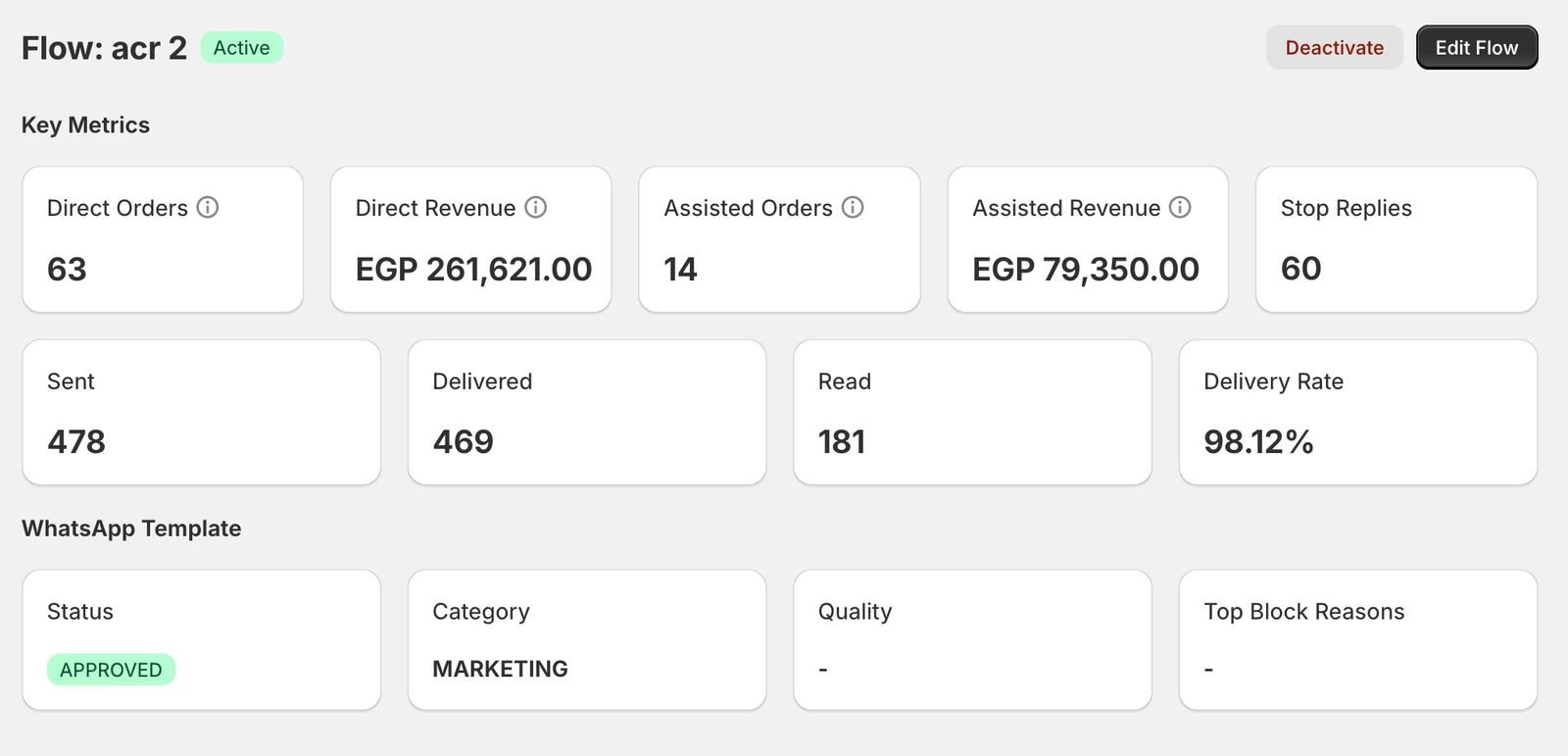
Whapi, a Shopify app for WhatsApp automation, sends your messages through Meta’s official WhatsApp Business API from your own number, so Meta reviews and categorizes every template you create in Whapi. Each flow’s analytics page shows the template’s status, the category Meta assigned, its quality rating and the top block reasons, next to sent, delivered and read counts and Stop replies.
That makes a category change visible without opening WhatsApp Manager. You pay Meta’s message fees directly, with no markup from Whapi, on the Pro and Team plans.
Utility vs marketing template questions
A utility template follows up on something the customer did or asked for, such as their order, account or payment, and contains no promotion. A marketing template is anything meant to promote, sell, retarget or build a relationship, and Meta also counts mixed or unclear templates as marketing. Meta decides the category, and it sets both the price per message and the delivery rules.
An order confirmation is a utility template when it is about that customer's specific order and contains no promotion. Meta's own utility example is: Thank you! Your order {{order_number}} is confirmed. If you add a discount code, product recommendations or an upsell, Meta treats it as mixed content and categorizes it as marketing.
Marketing. Meta's guidelines list "You left {{items}} in your cart! Don't worry, we saved them. Checkout now below." as a retargeting example, and say retargeting messages are marketing even if the user requested them. Budget abandoned checkout messages at the marketing rate for each country.
Meta runs a recurring check on approved templates and moves a utility template to marketing when its content, or the messages actually sent with it, don't meet the utility guidelines. Common causes are a discount code, a link to new arrivals, a generic feedback request or promotional text inside a variable. Meta normally gives 1 day of notice by email, in WhatsApp Manager and through the template_category_update webhook. Businesses that have received a misuse warning get no notice.
Yes. In WhatsApp Manager, open Message Templates, follow the banner to Business Support, choose Template Category Updates, select the templates and click Request Review. You can request a review of templates that are marketing and approved, or utility or marketing and rejected, within 60 days of the category decision. If the review is approved the category changes back; if it is rejected the category stays.
It depends on the customer's country. On Meta's rate card effective October 1, 2026, a delivered marketing message costs $0.1365 in Germany against $0.0550 for utility, and $0.0635 against $0.0220 in the United Kingdom. Marketing costs more than utility in every market on the card, and marketing gets no volume discounts.
No. Meta gives each template exactly one category, and each delivered message is charged once at that category's rate. A template that mixes order details with a promotion, such as an order update with a discount code, is categorized as marketing. To keep order messages at the utility rate, send promotions as a separate marketing template.
It can be. Meta lists confirming an opt-in to receive WhatsApp messages, as a follow-up to opt-in collected on another channel, as a utility use. A plain confirmation such as "Thanks for confirming. You'll now get updates about your orders on WhatsApp." fits that. Adding a welcome discount or product suggestions makes the message marketing.
No. Whapi submits your templates to Meta through the official WhatsApp Business API, and Meta reviews them and assigns the category. Whapi shows the template's status, category and quality on each flow's analytics page, so you can see when Meta has approved or changed a template. Meta's message fees are billed to you by Meta with no markup from Whapi.
Sources
- Meta: Template categorization (guidelines, recategorization, reviews, misuse) (checked October 20, 2026)
- Meta: WhatsApp Business Platform pricing (checked October 20, 2026)
- Meta: Rate cards and volume tiers (checked October 20, 2026)
- Meta: Template review (checked October 20, 2026)
- Meta: Per-user marketing template message limits (checked October 20, 2026)
- Meta: Marketing templates (Offers and announcements controls) (checked October 20, 2026)
- Meta: Template pacing (checked October 20, 2026)
- Meta: Get opt-in for WhatsApp (checked October 20, 2026)
Keep reading
- TemplatesWhatsApp Message Templates for Shopify StoresCopy-ready WhatsApp templates for abandoned carts, order confirmations, shipping updates, review requests, Black Friday and campaigns, in several languages.Read
- TemplatesShipping Update WhatsApp Message TemplatesWhatsApp templates for order shipped, out for delivery, delivered and failed delivery messages, with tracking-link variables.Read
- TemplatesWhatsApp Marketing Message Templates for ShopifyWhatsApp marketing templates for launches, sales, Black Friday, Cyber Monday, Christmas and win-back campaigns, with opt-in rules and Meta fees.Read
- BlogMeta's October 2026 WhatsApp Pricing Change ExplainedWhat changed in Meta's WhatsApp Business API pricing on October 1, 2026, and what it means for the cost of order updates and campaigns.Read
Send utility order messages from your own WhatsApp number.
Join 5,000+ merchants using Whapi. Install it from the Shopify App Store, connect your WhatsApp Business number and turn on your first automation in minutes. Every plan starts with a 7-day free trial.