Send a WhatsApp newsletter to your Shopify customers
Whapi, a Shopify app for WhatsApp automation, collects WhatsApp opt-ins with a signup widget on your store and sends campaigns to Shopify customer segments from your own number. Each campaign is a Meta marketing template, and you pay Meta’s per-message fee directly, with no markup from Whapi.
Used by 5,000+ merchantsRated 5 stars by 39 merchants7-day free trialBuilt for Shopify
The short answer
- Whapi adds a WhatsApp newsletter signup widget and popup to your Shopify store and sends campaigns to the customers who opt in.
- Campaigns are marketing templates sent from your own number on the official WhatsApp Business API, targeted by Shopify segments and scheduled ahead.
- Meta charges per delivered marketing message by the customer’s country, for example $0.1365 in Germany and $0.0635 in the United Kingdom, with no markup from Whapi.
- Meta requires opt-in that names your business, and caps how many customers you can reach per 24 hours, starting at 250 for a new business portfolio.
- Included on Pro ($18.99/month) and Team ($45/month), each with a 7-day free trial.
How a WhatsApp newsletter works in Shopify with Whapi
You collect opt-ins on your store, write a marketing template, pick a Shopify segment and a send time, and the campaign goes out once Meta approves the template. Ready-to-edit wording for launches, sales and holidays is on the WhatsApp marketing templates page.
- 1
Collect opt-ins on your store
Add the Whapi newsletter signup widget or popup to your storefront. Make sure the signup text names your store and says what customers will receive. The WhatsApp chat button and popup page shows the storefront side. - 2
Write the campaign
Build a marketing template with an optional image header, your text with variables such as the customer’s first name, and buttons that link to a product or collection. - 3
Pick a Shopify segment and a send time
Target customers by Shopify data such as purchase history, order value and tags, for example “customers who haven’t purchased yet”, and schedule the date and time. - 4
Meta reviews it, then it sends
Meta reviews new templates automatically, which can take up to 24 hours. The campaign starts once Meta approves it, and you can pause, resume or cancel it.
Signup, campaigns and results in one Shopify app
Signup widget and popup
Collect WhatsApp numbers from shoppers who want your offers, right on your storefront.
Shopify segments
Send to customers by purchase history, order value or tags instead of your whole list.
Images, text and buttons
Templates can carry an image header, personal variables and buttons that open a product page.
Scheduled sends
Set the date and time in advance, then pause, resume or cancel a campaign while it runs.
Orders and revenue per send
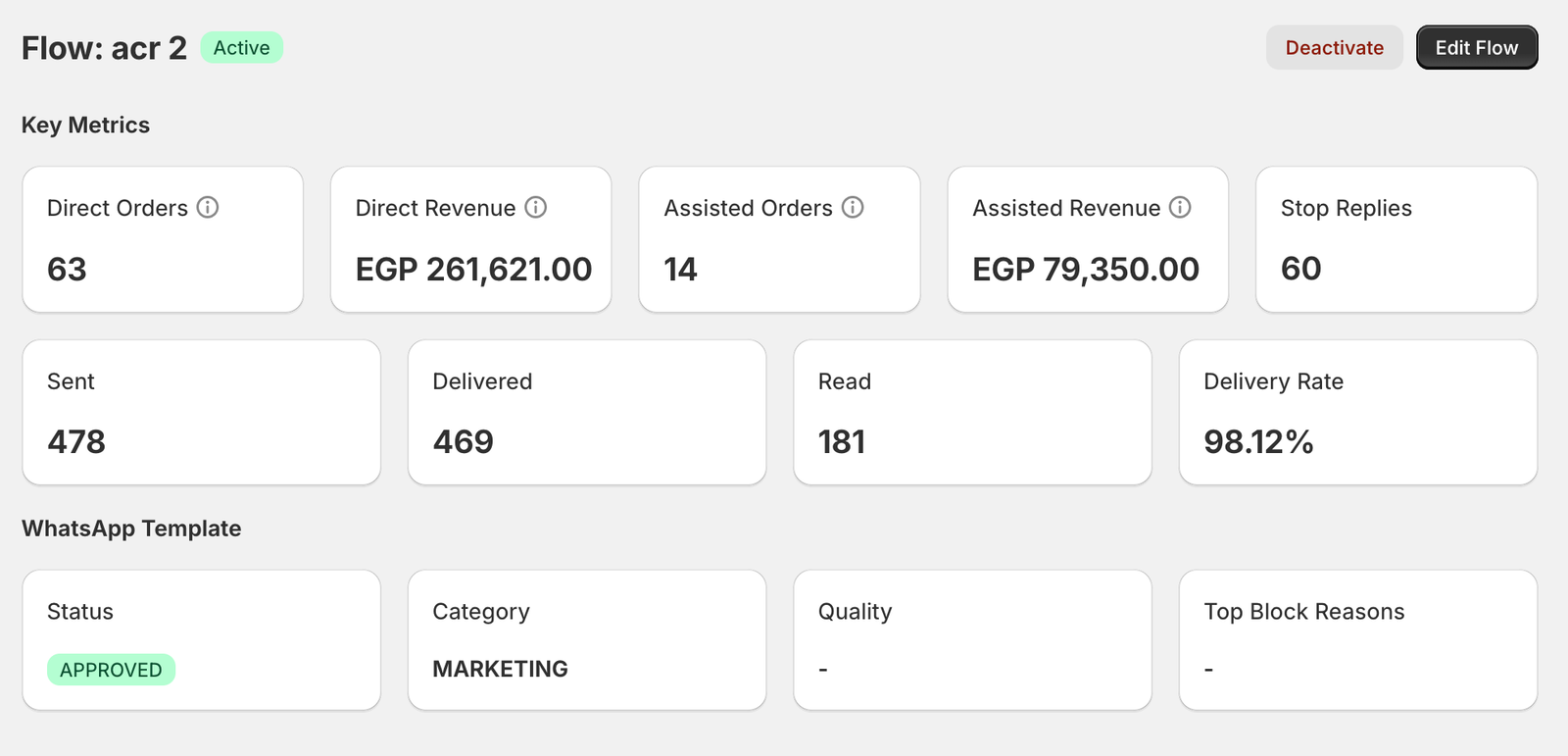
See sent, delivered, read and failed messages, the reason for each failure, and attributed orders and revenue.
Your own number
Campaigns come from your WhatsApp Business number, so replies land in your chats like any message.
See what each marketing send earned
Whapi reports direct and assisted orders and revenue, stop replies and delivery for each marketing flow, next to the template’s Meta status and category. You can also ask Claude to create or pause campaigns through the Whapi connector for Claude.
WhatsApp newsletter opt-in rules
Meta requires opt-in before you message anyone on WhatsApp. These rules come from Meta’s opt-in guide and the WhatsApp Business Messaging Policy.
| Rule | What it means for your signup form |
|---|---|
| Say what the person is opting in to | Make clear they will receive messages from your business on WhatsApp. |
| Name your business | Use the store name customers know, the same one they will see in WhatsApp. |
| Follow local law | Under GDPR this usually means consent and a record of each opt-in. See how Whapi handles GDPR. |
| Separate categories | Meta recommends separate opt-ins for order updates and for offers, which lowers the risk of blocks. |
| Honor every opt-out | Stop messaging anyone who asks, on WhatsApp or anywhere else, and say how to unsubscribe. |
What a WhatsApp campaign costs
Meta charges each delivered marketing message once, at the rate for the customer’s country code. Messages that fail are not charged, and marketing rates have no volume discounts. Whapi charges only the plan price.
| Customer’s country | Marketing, per message | 1,000 marketing messages |
|---|---|---|
| Germany | $0.1365 | $136.50 |
| United Kingdom | $0.0635 | $63.50 |
| France | $0.0859 | $85.90 |
| Italy | $0.0795 | $79.50 |
| Spain | $0.0707 | $70.70 |
| Netherlands | $0.1597 | $159.70 |
| Poland | $0.0366 | $36.60 |
| United States and Canada (North America) | $0.0250 | $25.00 |
| United Arab Emirates | $0.0576 | $57.60 |
| Saudi Arabia | $0.0576 | $57.60 |
How many customers one campaign can reach
Meta’s messaging limit caps how many different customers your business can reach with template messages in a moving 24-hour period. New business portfolios start at 250, then move up to 2,000, 10,000, 100,000 and unlimited. Meta business verification and high message quality help raise it, and every number in your portfolio shares the same limit.
Meta can also hold back a marketing message to a person who has received many recently. That shows as WhatsApp error 131049, and Meta says to wait at least 24 hours before trying that customer again.
WhatsApp newsletter vs WhatsApp Channel
A Whapi newsletter campaign is a personal message in each opted-in customer’s chat. A WhatsApp Channel is a one-way feed that people choose to follow, and you never see their numbers.
| Whapi newsletter campaign | WhatsApp Channel | |
|---|---|---|
| How it arrives | One-to-one in each customer’s chat | A one-way post in the Updates tab |
| Who gets it | Opted-in customers in the Shopify segment you choose | Anyone who follows the channel |
| Can customers reply in chat | Yes, replies arrive as normal chats | No, a channel is one-way |
| Do you see their number | Yes, they are your Shopify customers | No, followers’ numbers are hidden |
| Personal details such as first name | Yes, with template variables | No, one post for every follower |
| Runs on the WhatsApp Cloud API | Yes | No, Meta lists channels as unsupported |
Fast and easy. Good for simple automation and cart recovery. I was looking for a way to mass communicate to my audience without losing the personal touch and Whapi was a simple and great way to do that! …
CaliChimps
Singapore · Shopify App Store review
WhatsApp newsletter questions
How do I send a WhatsApp newsletter from my Shopify store?
Install a WhatsApp app that runs on the official WhatsApp Business API, such as Whapi, and connect your WhatsApp Business number. Collect opt-ins with a signup widget or popup on your store, write the campaign as a marketing template, choose a Shopify customer segment and a send time, and let Meta review the template. The campaign starts sending once Meta approves it.
Do customers need to opt in to WhatsApp marketing messages?
Yes. Meta requires you to get opt-in before you message people on WhatsApp. The opt-in must clearly say that the person agrees to receive messages from your business and must name your business. You must also follow local law and honor every request to stop, whether it comes on WhatsApp or anywhere else.
How much does a WhatsApp newsletter cost per message?
Meta charges each delivered marketing message at the rate for the customer’s country. On Meta’s rate card effective October 1, 2026, that is $0.1365 in Germany and $0.0635 in the United Kingdom, so 1,000 delivered messages cost about $136.50 and $63.50. Marketing messages have no volume discounts. Whapi adds no markup; you pay Meta directly and Whapi only charges its plan price.
How many customers can I send a WhatsApp campaign to?
Whapi sets no cap, but Meta does. A messaging limit caps how many different customers your business can reach with template messages in a moving 24-hour period. New business portfolios start at 250 and can grow to 2,000, 10,000, 100,000 and then unlimited as you verify your business and keep message quality high. The limit is shared by every number in your Meta business portfolio.
Why didn’t some customers receive my WhatsApp campaign?
The most common reasons are error 131049 and error 131026. With 131049, Meta held back the marketing message to limit how many marketing messages each person receives; wait at least 24 hours before trying that customer again. With 131026, the number is not on WhatsApp or the customer’s app needs updating. Whapi shows failed messages and the reason for each.
Is a WhatsApp newsletter the same as a WhatsApp Channel?
No. A WhatsApp Channel is a one-way broadcast that people follow in the Updates tab, and followers’ phone numbers are hidden from you. A Whapi newsletter is a message sent one-to-one to each opted-in customer’s chat, so it can use their name and they can reply. Meta lists channels as not supported on the Cloud API.
Can I still use broadcast lists in the WhatsApp Business App?
Not if your number uses coexistence. When you connect a WhatsApp Business App number to the Cloud API, Meta disables broadcast lists in the app: you can’t create new ones and existing lists become read-only. Send campaigns from Whapi instead, which also lets you target Shopify segments.
Is WhatsApp marketing allowed under GDPR and similar privacy laws?
Yes, with consent. If you sell to customers in the EU or UK, you need a lawful basis for marketing messages, which for WhatsApp newsletters is usually the customer’s consent. Keep a record of when and how each customer opted in, make unsubscribing easy and delete data on request. This is general information, not legal advice.
Which Whapi plan includes the WhatsApp newsletter?
Both Whapi plans include the newsletter signup widget, the popup and WhatsApp campaigns: Pro at $18.99 per month (or $149 per year) and Team at $45 per month (or $299 per year). Both start with a 7-day free trial.
How do customers unsubscribe from a WhatsApp newsletter?
Tell them how in every campaign, for example “Reply STOP to unsubscribe”, and stop messaging anyone who asks. Meta recommends clear opt-out instructions for each category of message. Whapi counts stop replies for each flow, so you can see how many people asked to stop after a send.
Sources
- Meta: Get opt-in for WhatsApp (checked October 20, 2026)
- WhatsApp Business Messaging Policy (checked October 20, 2026)
- Meta: WhatsApp Business Platform pricing and rate cards (checked October 20, 2026)
- Meta: Messaging limits (checked October 20, 2026)
- Meta: WhatsApp Cloud API error codes (131049, 131026) (checked October 20, 2026)
- Meta: Onboard WhatsApp Business app users (coexistence) (checked October 20, 2026)
- WhatsApp blog: Introducing WhatsApp Channels (June 8, 2023) (checked October 20, 2026)
Keep reading
- TemplatesWhatsApp Marketing Message Templates for ShopifyWhatsApp marketing templates for launches, sales, Black Friday, Cyber Monday, Christmas and win-back campaigns, with opt-in rules and Meta fees.Read
- FeaturesWhatsApp Chat Button & Popup for ShopifyAdd a WhatsApp chat button and popup to your Shopify store so shoppers can message you in one tap. Customize placement, text and opening message.Read
- LegalWhatsApp GDPR for Shopify Stores: How Whapi Handles DataHow Whapi handles personal data for stores in the EU and UK: consent and opt-in for WhatsApp, data processing, retention and deletion requests.Read
Start your WhatsApp newsletter.
Install Whapi from the Shopify App Store, connect your WhatsApp Business number and add the signup widget to your store. Every plan starts with a 7-day free trial.