Copy-ready WhatsApp message templates for the messages a Shopify store sends most: abandoned cart reminders, order confirmations, shipping updates, review requests and campaigns. Every template shows its variables, buttons, the category Meta is likely to give it and when to send it.
Hi Lena, you left a few items in your cart at Linden & Co. We kept them for you.
Finish your order here: lindenandco.example/checkout
Reply STOP to stop these reminders.19:42
Thanks! Does the wool scarf ship to Austria?19:50
Yes, we ship to Austria in 3 to 5 working days. Delivery is free on orders over €60.19:52
An abandoned cart template after Whapi fills in the Shopify variables, and the customer’s reply.
The short answer
A WhatsApp message template is a pre-written message that Meta reviews before a business can send it. On the WhatsApp Business API, templates are the only way to message a customer first, or after 24 hours without a message from them.
A template has a body of up to 1,024 characters, an optional header and footer of up to 60 characters, and up to 10 buttons.
Meta puts every template in one category, Utility, Marketing or Authentication, and the category sets the price. In Germany a Utility message costs $0.0550 and a Marketing message $0.1365 (Meta rates effective October 1, 2026).
Order confirmations and shipping updates are usually Utility. Abandoned cart reminders and promotions are Marketing.
In Whapi, a Shopify app for WhatsApp automation, you write templates with Shopify variables such as the customer’s first name and order number, and Whapi fills them in for every order.
By use case
WhatsApp message templates by use case
Each set has copy-ready messages, the variables to use, the buttons to add and the Meta category to expect. Most sets include German, French, Spanish or Italian versions, and some add Arabic.
Short versions of the messages most Shopify stores turn on first. Copy the text, then open the full set for more versions, follow-up messages and timing advice.
Abandoned cart reminder
Likely Marketing
Hi {{customer_first_name}}, you left a few items in your cart at {{store_name}}. We kept them for you.
Finish your order here: {{checkout_url}}
Reply STOP to stop these reminders.
When to send
About an hour after the checkout is abandoned.
Meta category
Marketing, most likely. Meta lists cart reminders as Marketing.
Hi {{customer_first_name}}, thank you for your order {{order_number}} for {{total_price}}.
Please tap a button below to confirm it, or cancel it if something is wrong.
Confirm Order
Cancel Order
When to send
Seconds after the order is placed.
Meta category
Utility, most likely. Meta decides the category when it reviews the template.
Hi {{customer_first_name}}, your order {{order_number}} is on its way.
Follow your parcel here: {{tracking_url}}
Reply to this message if you have any questions.
When to send
When you fulfill the order in Shopify and add tracking.
Meta category
Utility, most likely. Meta decides the category when it reviews the template.
Hi {{customer_first_name}}, we hope you are enjoying your order from {{store_name}}.
Would you take a minute to tell other shoppers what you think? Your review helps a small store a lot.
Write a review
When to send
A few days after delivery.
Meta category
Marketing, most likely. Meta usually treats review requests as Marketing.
Hi {{customer_first_name}}, our Black Friday sale at {{store_name}} opens to WhatsApp subscribers first: [25]% off [everything] from [Thursday, 6 pm].
Tap below to shop before everyone else.
Shop early access
Stop offers
When to send
The day before the public sale, to customers who opted in to promotions.
Meta category
Marketing, most likely. Meta decides the category when it reviews the template.
A WhatsApp message template is a message format a business submits to Meta for review before it can send it through the WhatsApp Business API. Meta requires a template whenever the business messages a customer first, or when more than 24 hours have passed since the customer’s last message. Inside that 24-hour customer service window, the business can reply with normal free-form messages.
For a Shopify store, that means almost every automated message is a template: order confirmations, cart reminders and shipping updates all start from the store. Whapi sends them through Meta’s official WhatsApp Business API from your own number, and you pay Meta’s message fees directly.
Parts of a template and Meta’s limits
A template has one required part, the body, plus an optional header, footer and buttons. These are Meta’s limits for each part:
Part
Required
Meta’s limit
Store example
Header
No
60 characters of text with 1 variable, or media
A product photo
Body
Yes
1,024 characters, several variables
The confirmation itself
Footer
No
60 characters, text only
An opt-out line
Buttons
No
Up to 10 in total: up to 10 quick reply, 2 URL and 1 phone number; 25 characters per label
Confirm Order and Cancel Order
When a template has more than three buttons, WhatsApp shows two and puts the rest under “See all options”. Quick reply buttons also have to be grouped together, before or after any other button types. For most store messages, two or three buttons are enough.
How variables work in Whapi templates
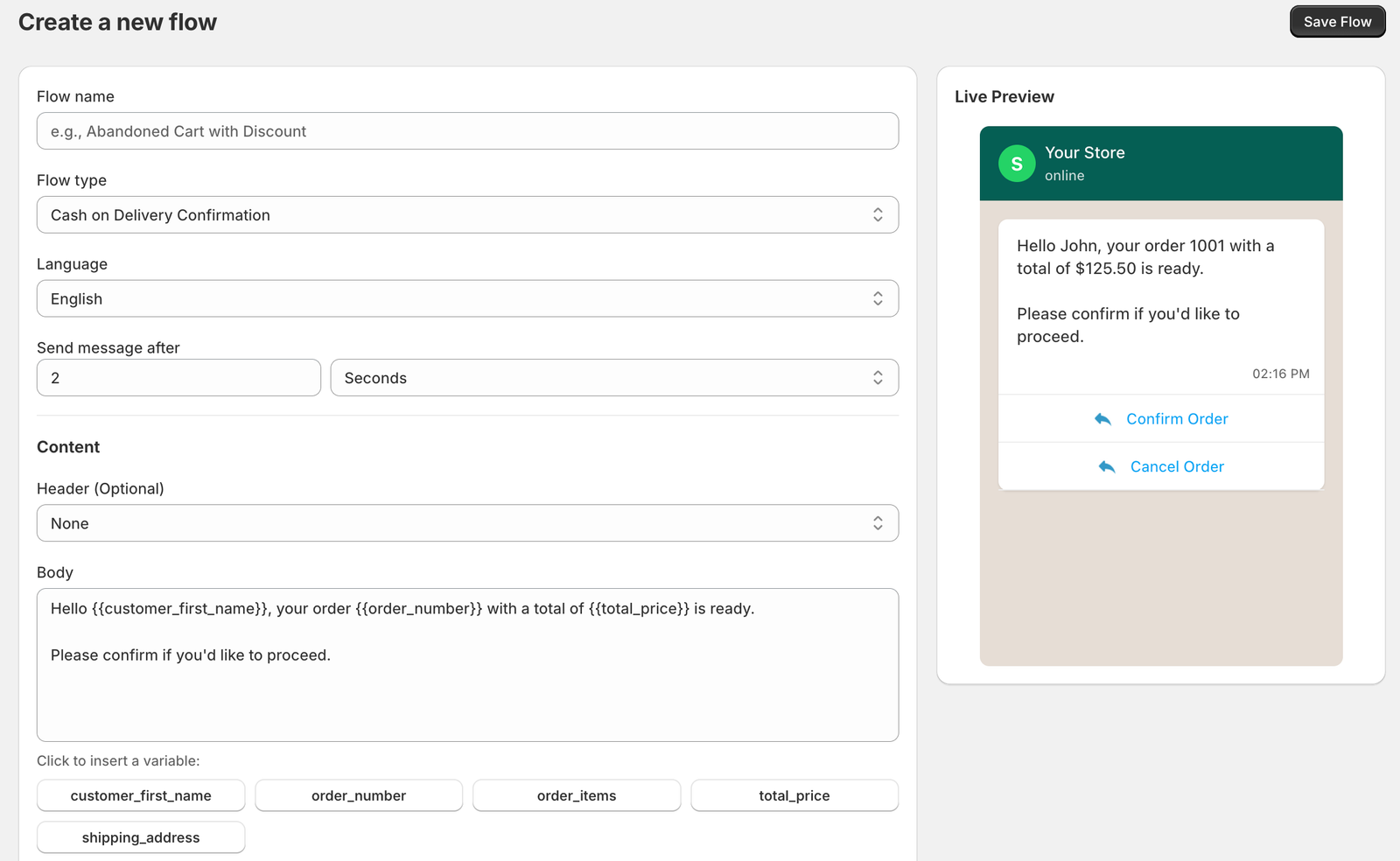
Variables are placeholders in double curly braces that Whapi replaces with data from the Shopify order or checkout when it sends the message. In the Whapi flow editor, you click a variable under the Body field to insert it, and the live preview shows the result. For example, Hello {{customer_first_name}}, your order {{order_number}} with a total of {{total_price}} is ready. appears to the customer as “Hello John, your order 1001 with a total of $125.50 is ready.”
Variable
What it inserts
Used in
{{customer_first_name}}
The customer’s first name
Almost every template
{{order_number}}
The Shopify order number
Confirmations and shipping updates
{{order_items}}
The products in the order
Order confirmations
{{total_price}}
The order total with its currency
Order confirmations
{{shipping_address}}
The shipping address on the order
Address checks
{{tracking_url}}
The tracking link on the Shopify fulfillment
Shipping updates
{{checkout_url}}
The link back to the abandoned checkout
Abandoned cart reminders
{{product_name}}
A product name
Cart reminders
{{store_name}}
Your store name
Cart reminders
The variables available depend on the flow type. The Whapi editor lists them under “Click to insert a variable”.
The Whapi flow editor: variables under the Body field and a live preview on the right.
Meta reviews each template with a sample value for every variable. It rejects templates that start or end with a variable, and templates with too many variables for the length of the text.
Utility, Marketing and Authentication: what each costs
Meta charges per delivered template message, and the price depends on the template’s category and the country code of the customer’s number. Every template gets exactly one category:
Utility: about a specific order or account, with no promotion. Order confirmations, shipping updates and delivery notices.
Marketing: anything promotional. Offers, launches, abandoned cart reminders, and any order update that includes a promotion.
Authentication: one-time passcodes for logging in or verifying an account.
Customer’s country
Utility per message
Marketing per message
Marketing vs Utility
Germany
$0.0550
$0.1365
2.5 times
United Kingdom
$0.0220
$0.0635
2.9 times
France
$0.0300
$0.0859
2.9 times
Italy
$0.0300
$0.0795
2.7 times
Spain
$0.0200
$0.0707
3.5 times
Netherlands
$0.0500
$0.1597
3.2 times
Poland
$0.0122
$0.0366
3.0 times
United States and Canada
$0.0034
$0.0250
7.4 times
United Arab Emirates
$0.0157
$0.0576
3.7 times
Meta’s USD list rates per delivered message, effective October 1, 2026, checked October 20, 2026. Utility rates drop in steps at high monthly volume. Whapi adds no markup. Every country: WhatsApp API pricing by country.
Meta decides the category at review. Since April 9, 2025, a template submitted as Utility that Meta considers Marketing is approved as Marketing, and Meta can recategorize approved templates later, normally with a day’s notice. Since October 1, 2026, Utility templates are also charged when sent inside an open 24-hour window. The Utility vs Marketing template guide covers the rules, and WhatsApp API pricing by country lists every rate.
How Meta reviews and approves templates
Meta reviews every new or edited template automatically and says a decision can take up to 24 hours. Only approved templates can be sent; rejected, paused and disabled templates can’t. Whapi shows each flow’s template status, Meta category, quality rating and top block reasons on the flow page.
The rejection reasons Meta lists that matter most for store templates:
The message starts or ends with a variable
Variables with missing or mismatched curly braces
Too many variables for the length of the message
The same body and footer as a template you already have
Requests for sensitive information, or threatening wording
You can edit a rejected template and resubmit it, or appeal the decision. An appeal needs sample values, and Meta says it decides appeals within 24 hours. Step by step help is on the WhatsApp template rejected page.
Rules for Shopify store templates
These five rules keep store templates within Meta’s policies and give customers fewer reasons to block your number:
Get opt-in. Meta requires that the customer agreed to receive messages from your business and that the opt-in names your business. Meta accepts opt-in collected on your website, for example at checkout, as long as it meets both rules. Meta also recommends a separate opt-in for each message category, such as order updates and promotions. Stores selling to customers in the EU and the UK also need a lawful basis for marketing messages under GDPR: see how Whapi handles GDPR and customer data.
Keep Utility templates clean. No discount codes, upsells or “you may also like” links in order confirmations or shipping updates.
Give an easy way out of Marketing messages, such as “Reply STOP to stop these messages.” Whapi counts Stop replies for each flow.
Be specific. Name the order, the amount and the next step, so the message can only be about that customer.
One job per message. Send the confirmation, the shipping update and the review request as separate templates.
Templates in German, French and other languages
You can write WhatsApp templates in any language WhatsApp supports, but each template has one language and Meta does not translate it. In Whapi, each flow has a Language setting that tells Meta which language the template is in.
A store that sells in several countries through Shopify Markets usually needs one version of each template per language. The abandoned cart, shipping update, review request and marketing sets include German, French, Spanish or Italian examples next to the English versions, and some sets add an Arabic version further down. Variables such as {{customer_first_name}} stay in English inside translated text, and button labels can be written in the customer’s language. Ask a native speaker to check any template before you submit it.
WhatsApp template questions
A WhatsApp message template is a pre-written message format that a business submits to Meta for review before sending it through the WhatsApp Business API. It has a body of up to 1,024 characters, an optional header and footer of up to 60 characters each, and optional buttons. Variables in double curly braces are filled in for each customer when the message is sent.
Yes, whenever you message the customer first or more than 24 hours have passed since their last message to you. Inside that 24-hour customer service window you can reply with normal free-form messages. That is why automated store messages such as order confirmations, cart reminders and shipping updates are templates: the store speaks first.
Meta reviews templates automatically when you create or edit them and says a decision can take up to 24 hours. If Meta rejects a template, you can edit it and resubmit it, or appeal the decision with sample values. Meta says it decides appeals within 24 hours.
Use variables. In Whapi you click a variable such as {{customer_first_name}}, {{order_number}} or {{total_price}} under the Body field to insert it, and Whapi fills it in from the Shopify order when it sends the message. Meta does not allow a template to start or end with a variable, so put each one inside a sentence.
Because Meta decided the content is promotional. A Utility template must be non-promotional and specific to the customer, such as an order confirmation. Since April 9, 2025 Meta approves a template submitted as Utility as Marketing when it disagrees. Remove offers, upsells and product recommendations and submit a new version, or request a review within 60 days.
Meta charges per delivered message, by template category and the country code of the customer's number. For example, a Utility message costs $0.0550 in Germany and $0.0107 in Saudi Arabia, while a Marketing message costs $0.1365 and $0.0576 (USD list rates effective October 1, 2026). With Whapi you pay Meta directly, with no markup.
Yes. A template can have up to 10 buttons in total: up to 10 quick reply buttons, up to 2 URL buttons and 1 phone number button, each with a label of up to 25 characters. In Whapi, quick reply buttons can add a Shopify order tag and send a follow-up message, which is how Confirm and Cancel buttons on order confirmations work.
Yes. You can write templates in any language WhatsApp supports, including German, French, Spanish, Italian, Dutch, Polish and Arabic. Each template has one language, and Meta does not translate it, so a store selling in several countries creates a separate version for each language. The Whapi template sets include German, French, Spanish and Italian examples next to the English versions.
Yes. The WhatsApp templates on usewhapi.com are free to copy into Whapi or any other tool that uses the WhatsApp Business API, and you can change the wording to fit your store. Meta still reviews every template you submit and decides its category, so no template is guaranteed to be approved as Utility.
Join 5,000+ merchants using Whapi. Install it from the Shopify App Store, connect your WhatsApp Business number and turn on your first automation in minutes. Every plan starts with a 7-day free trial.