Order confirmation WhatsApp message templates for COD orders
Copy these order confirmation WhatsApp messages to ask cash on delivery customers to confirm or cancel before you ship. Each one fits the Cash on Delivery Confirmation flow in Whapi, a Shopify app for WhatsApp automation, with Shopify variables, Confirm and Cancel buttons and a follow-up for every reply.
Hi Omar, your order 1052 is ready to ship to:
Building 14, King Fahd Road, Al Olaya, Riyadh
Total to pay on delivery: SAR 320.00
Is this address correct?18:04
Confirm Order
Change Address
Cancel Order
Change Address18:06
No problem. Reply with the correct address and a nearby landmark, and our team will update your order.18:06
Same building, apartment 7 not 5. Next to the pharmacy.18:07
The address check template: the customer taps Change Address and replies with the fix.
The short answer
A COD order confirmation WhatsApp message asks the customer to confirm a cash on delivery order before you ship it, using two quick reply buttons: Confirm Order and Cancel Order.
In Whapi, each button adds a Shopify order tag, such as Confirmed or Cancelled, and can send its own follow-up message. An auto-cancel option can also cancel the order in Shopify when the tag is added.
The Whapi COD flow fills in the customer’s first name, order number, order items, total price and shipping address from the Shopify order.
Meta decides the category. A confirmation about one order with no offer is usually Utility: $0.0107 per message in Saudi Arabia and $0.0150 in Pakistan (Meta rates effective October 1, 2026).
Keep discount codes out. Meta treats an order update that includes a promotion as Marketing.
Copy and paste
Order confirmation WhatsApp messages for cash on delivery
Four English templates for the Cash on Delivery Confirmation flow in Whapi. Paste one into the Body field, add the buttons, then set the Shopify tag and follow-up message for each button.
Standard COD confirmation
Likely Utility
Hi {{customer_first_name}}, thanks for your order {{order_number}}.
Total to pay on delivery: {{total_price}}
Please confirm your order so we can ship it.
Confirm Order
Cancel Order
Use it for
The default for most stores: the order number, the amount to pay and two buttons.
When to send
A few seconds after the order is placed. Set the delay in “Send message after” in the flow.
Meta category
Utility, most likely. Meta decides the category when it reviews the template.
Buttons
Confirm Order (Quick reply, adds the tag Confirmed)Follow-up messageThank you, your order is confirmed. We will ship it soon.
Cancel Order (Quick reply, adds the tag Cancelled)Follow-up messageYour order has been cancelled as requested.
Hi {{customer_first_name}}, please check your order {{order_number}} before we ship it:
{{order_items}}
Total to pay in cash on delivery: {{total_price}}
Tap Confirm Order if everything is right, or Cancel Order if you no longer want it.
Confirm Order
Cancel Order
Use it for
Orders with several products, where a wrong size or color often ends in a refused parcel.
When to send
Seconds after the order is placed, instead of the standard template.
Meta category
Utility, most likely. Meta decides the category when it reviews the template.
Buttons
Confirm Order (Quick reply, adds the tag Confirmed)Follow-up messageThanks for confirming. We are packing your order now.
Cancel Order (Quick reply, adds the tag Cancelled)Follow-up messageDone, your order is cancelled. You can order again from our store at any time.
Meta rejects templates with too many variables for their length. This one has four variables and enough text around them.
Address check with three buttons
Likely Utility
Hi {{customer_first_name}}, your order {{order_number}} is ready to ship to:
{{shipping_address}}
Total to pay on delivery: {{total_price}}
Is this address correct?
Confirm Order
Change Address
Cancel Order
Use it for
Markets where incomplete addresses cause failed deliveries, such as apartment numbers or landmarks missing.
When to send
Seconds after the order is placed. Works best for stores that ship mostly to apartments.
Meta category
Utility, most likely. Meta decides the category when it reviews the template.
Buttons
Confirm Order (Quick reply, adds the tag Confirmed)Follow-up messageThank you, your order is confirmed and will ship to this address.
Change Address (Quick reply, adds the tag Address change)Follow-up messageNo problem. Reply with the correct address and a nearby landmark, and our team will update your order.
Cancel Order (Quick reply, adds the tag Cancelled)Follow-up messageYour order has been cancelled as requested.
The customer’s reply opens Meta’s 24-hour customer service window, so your team can answer with normal messages in the WhatsApp Business App or the Whapi Team Inbox.
Confirmation with delivery time
Likely Utility
Hi {{customer_first_name}}, your cash on delivery order {{order_number}} is booked.
Amount to pay the courier: {{total_price}}
Delivery: 2 to 4 working days after you confirm
Please confirm so we can hand it to the courier.
Confirm Order
Cancel Order
Use it for
Setting expectations so the customer is home, with cash ready, when the courier arrives.
When to send
Seconds after the order is placed.
Meta category
Utility, most likely. Meta decides the category when it reviews the template.
Buttons
Confirm Order (Quick reply, adds the tag Confirmed)Follow-up messageThank you. Your order is confirmed and will reach you in 2 to 4 working days.
Cancel Order (Quick reply, adds the tag Cancelled)Follow-up messageYour order is cancelled. Thanks for letting us know.
Replace “2 to 4 working days” with your real delivery time. A promise you can’t keep leads to refusals at the door.
Use these templates in Whapi
Create a Cash on Delivery Confirmation flow, paste a template into the Body field, add the buttons and tags, and save. Meta reviews the template before the first confirmation goes out. Every plan starts with a 7-day free trial.
Write to customers in the language they use every day. These versions are written for Saudi Arabia, the UAE, the wider Gulf and Pakistan. They are examples: ask a native speaker to check the wording for your audience before you submit a template to Meta.
COD confirmation in Arabic
Likely UtilityArabicExample for native review
مرحباً {{customer_first_name}}، شكراً لطلبك رقم {{order_number}}.
المبلغ المطلوب عند الاستلام: {{total_price}}
يرجى تأكيد الطلب حتى نتمكن من شحنه إليك، أو إلغاؤه إذا لم تعد بحاجة إليه.
تأكيد الطلب
إلغاء الطلب
Use it for
Stores selling across the Arab world. Modern Standard Arabic that customers in every market can read.
When to send
Seconds after the order is placed. Set the flow’s Language to Arabic.
Meta category
Utility, most likely. Meta decides the category when it reviews the template.
Buttons
تأكيد الطلب (Quick reply, adds the tag Confirmed)Follow-up messageشكراً، تم تأكيد طلبك وسنقوم بشحنه في أقرب وقت.
إلغاء الطلب (Quick reply, adds the tag Cancelled)Follow-up messageتم إلغاء طلبك بناءً على رغبتك.
Keep the Shopify tags in English so your team can filter orders the same way in every language.
COD confirmation in Gulf Arabic
Likely UtilityGulf ArabicExample for native review
هلا {{customer_first_name}}، شكراً لطلبك رقم {{order_number}}.
المبلغ المطلوب عند الاستلام: {{total_price}}
عنوان التوصيل: {{shipping_address}}
نرجو تأكيد الطلب حتى نرسله لك.
تأكيد الطلب
إلغاء الطلب
Use it for
Stores selling in Saudi Arabia, the UAE, Kuwait, Qatar and Oman. Shows the delivery address for a quick check.
When to send
Seconds after the order is placed. Set the flow’s Language to Arabic.
Meta category
Utility, most likely. Meta decides the category when it reviews the template.
Buttons
تأكيد الطلب (Quick reply, adds the tag Confirmed)Follow-up messageتم تأكيد طلبك، بنرسله لك قريب إن شاء الله.
إلغاء الطلب (Quick reply, adds the tag Cancelled)Follow-up messageتم إلغاء طلبك حسب طلبك.
Assalam o Alaikum {{customer_first_name}}, aapka order {{order_number}} humein mil gaya hai.
Delivery par ada karne wali raqam: {{total_price}}
Baraye meharbani order confirm karein taake hum isay dispatch kar sakein.
Confirm Order
Cancel Order
Use it for
Stores selling in Pakistan, where many customers read Urdu written in English letters.
When to send
Seconds after the order is placed.
Meta category
Utility, most likely. Meta decides the category when it reviews the template.
Buttons
Confirm Order (Quick reply, adds the tag Confirmed)Follow-up messageShukriya! Aapka order confirm ho gaya hai, jald dispatch kar diya jayega.
Cancel Order (Quick reply, adds the tag Cancelled)Follow-up messageAapka order cancel kar diya gaya hai.
The buttons keep the English labels Confirm Order and Cancel Order. Translate them too if your customers prefer Urdu.
R
Rimal HomeBusiness account
مرحباً مريم، شكراً لطلبك رقم 1048.
المبلغ المطلوب عند الاستلام: 250 ر.س
يرجى تأكيد الطلب حتى نتمكن من شحنه إليك، أو إلغاؤه إذا لم تعد بحاجة إليه.10:32
تأكيد الطلب
إلغاء الطلب
تأكيد الطلب10:33
شكراً، تم تأكيد طلبك وسنقوم بشحنه في أقرب وقت.10:33
The Arabic template as the customer sees it in WhatsApp.
Buttons, tags and follow-up messages
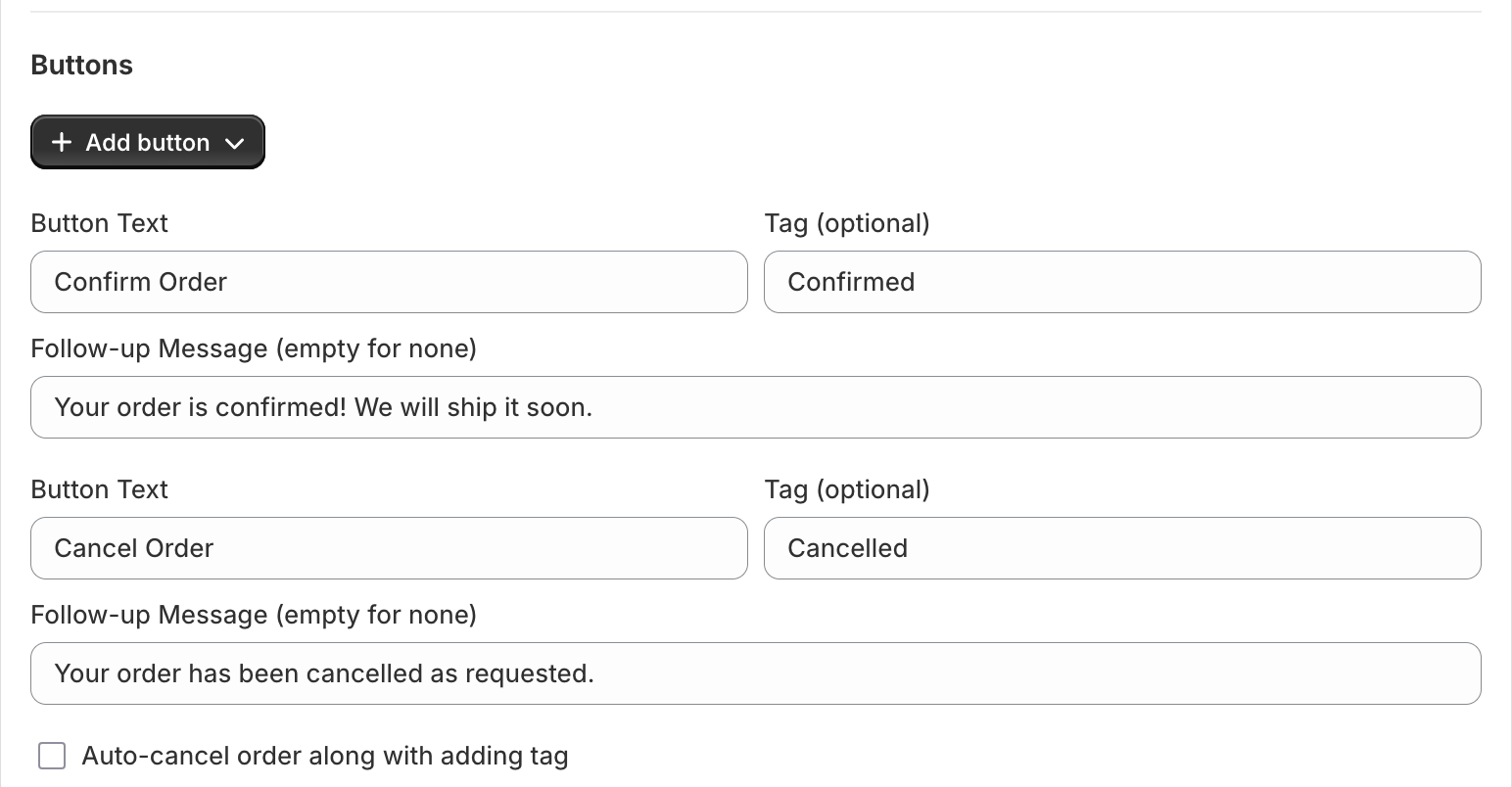
Every button in a Whapi COD flow has three settings: the button text the customer sees, an optional Shopify order tag, and an optional follow-up message sent right after the tap. The button settings also include an option to cancel the order in Shopify automatically when the tag is added.
Button
Tag Whapi adds
Follow-up message
What your team does next
Confirm Order
Confirmed
Order confirmed, shipping soon
Fulfill the order and book the courier
Change Address
Address change
Asks for the correct address
Update the address, then fulfill
Cancel Order
Cancelled
Confirms the cancellation
Nothing to ship, or let Whapi cancel it
No reply
No tag
None
Call the customer or hold the order
Button settings in Whapi: text, Shopify tag and follow-up message for each button.
Meta allows button labels of up to 25 characters and up to 10 quick reply buttons per template. When a template has more than three buttons, WhatsApp shows two and hides the rest behind “See all options”, so keep COD confirmations to two or three buttons.
Is a COD order confirmation Utility or Marketing?
A COD order confirmation is usually a Utility template, as long as it is about one specific order and contains no offer. Meta’s rules set two conditions for Utility: the message is non-promotional, and it is specific to the customer or something they requested. Confirming, updating or cancelling an order is one of the Utility use cases Meta lists, under order management.
These additions turn a confirmation into a Marketing template:
A discount code or free shipping on the next order
Product recommendations, upsells or “you may also like” links
Any line that tries to sell something
Since April 9, 2025, Meta approves a template submitted as Utility as Marketing if it decides the content is promotional, and it can recategorize approved templates later with advance notice. Whapi shows the category Meta gave each template on the flow page. The guide to Utility vs Marketing templates explains the rules in detail.
What a COD confirmation message costs
Meta charges each delivered confirmation at the Utility rate for the country code of the customer’s number, and Whapi adds no markup. Messages that are not delivered are not charged.
Customer’s country
Utility rate per message
1,000 messages
Saudi Arabia
$0.0107
$10.70
United Arab Emirates
$0.0157
$15.70
Kuwait
$0.0440
$44.00
Qatar
$0.0120
$12.00
Pakistan
$0.0150
$15.00
Morocco
$0.0230
$23.00
Meta’s USD list rates per delivered message, effective October 1, 2026, checked October 20, 2026. Utility rates drop in steps at high monthly volume. Whapi adds no markup. Every country: WhatsApp API pricing by country.
For example, confirming 3,000 COD orders a month to Pakistani numbers costs about $45 in Meta fees at the list rate. Since October 1, 2026, Meta also charges Utility templates sent while the customer’s 24-hour service window is open, so every confirmation counts. The app itself costs $18.99 a month on the Pro plan. Country details are on the Pakistan and Gulf WhatsApp API pricing pages.
Rules that get COD templates approved
Meta reviews every new or edited template automatically. These are the rejection reasons Meta lists that matter most for order confirmations:
Don’t start or end with a variable. Meta rejects “dangling” parameters, which is why every template on this page opens with a greeting and ends with a sentence.
Keep enough text around the variables. A template with too many variables for its length is rejected.
No threats. Warnings about legal action or public shaming for refused orders break Meta’s rules. Explain what happens next instead.
Don’t ask for sensitive data. Never request full card or ID numbers in a confirmation.
No duplicates. Meta rejects a template whose body and footer match one you already have.
If a template is still rejected, the template rejected help page explains how to read the reason and resubmit.
What to do when a customer doesn’t reply
Treat an order with no reply as unconfirmed and decide case by case. Orders without a Confirmed or Cancelled tag are easy to filter in Shopify, and many stores call those customers or hold high-value orders until someone answers.
A second WhatsApp message is limited by Meta’s 24-hour rule: you can send free-form messages only within 24 hours of the customer’s last message. A customer who never replied hasn’t opened that window, so any reminder has to be another approved template. More ways to cut refusals are in how to stop fake COD orders on Shopify.
Set up a COD confirmation template in Whapi
In Whapi, create a new flow and choose the Cash on Delivery Confirmation flow type.
Choose the language and set “Send message after”, for example a few seconds.
Paste a template into the Body field and insert variables from the list under the editor.
Add the buttons, then set the tag and follow-up message for each one.
Save the flow. Meta reviews the template, which Meta says can take up to 24 hours, and Whapi shows its status and category on the flow page.
Place a test cash on delivery order with your own WhatsApp number before you rely on it.
COD confirmation template questions
A good COD order confirmation message greets the customer by first name, gives the order number and the exact amount to pay on delivery, and asks them to confirm or cancel with two buttons: Confirm Order and Cancel Order. Optional extras are the order items, the shipping address and the expected delivery time. Keep it short, specific to that one order and free of offers.
Usually Utility. Meta's rules say a Utility template must be non-promotional and specific to the customer, and confirming a specific order fits Meta's order management use case. Meta makes the final decision at review, and since April 9, 2025 it approves a template as Marketing if it considers it promotional. In Saudi Arabia a Utility message costs $0.0107 and a Marketing message $0.0576 (Meta rates effective October 1, 2026).
You can, but Meta will then treat the template as Marketing, because Meta classes an order update with a promotion as Marketing. That raises the price of every confirmation and can limit delivery. Send the confirmation on its own and put offers in a separate marketing message to customers who agreed to receive them.
In Whapi, each button adds the Shopify order tag you choose, for example Cancelled, and can send a follow-up message such as "Your order has been cancelled as requested." The button settings also include an option to cancel the order in Shopify automatically when the tag is added, so a cancelled order is not shipped by mistake.
When a customer doesn't reply to a WhatsApp COD confirmation from Whapi, the Shopify order gets no Confirmed or Cancelled tag, so it is easy to filter. Many stores call these customers or hold high-value orders. A WhatsApp free-form message is only possible within 24 hours of the customer's last message, so a customer who never replied can only receive another approved template.
Yes. Write the template in the language your customers read and set the Language of the Whapi flow to match. Meta does not translate templates, so each language is its own template. This page has Arabic, Gulf Arabic and Roman-Urdu examples; have a native speaker check the wording before you submit it.
Meta charges each delivered confirmation at the Utility rate for the customer's country: $0.0150 in Pakistan and $0.0107 in Saudi Arabia (USD list rates effective October 1, 2026). You pay Meta directly and Whapi adds no markup. The Whapi Pro plan costs $18.99 per month with a 7-day free trial.
Install Whapi from the Shopify App Store and connect your WhatsApp Business number. Create a Cash on Delivery Confirmation flow, paste a template, add Confirm and Cancel buttons with the tags you want, and save. Once Meta approves the template, Whapi sends it automatically to every new cash on delivery order after the delay you set.
Meta lists these reasons among others: a message that starts or ends with a variable, too many variables for the length of the text, the same body and footer as a template you already have, and threatening wording, such as warning customers about legal action for refusing an order. Fix the wording and resubmit, or appeal the decision with sample values. Meta says it decides appeals within 24 hours.
Confirm your next COD order with one of these templates.
Join 5,000+ merchants using Whapi. Install it from the Shopify App Store, connect your WhatsApp Business number and turn on your first automation in minutes. Every plan starts with a 7-day free trial.