Use Whapi with Releasit, EasySell and other COD form apps
Whapi, a Shopify app for WhatsApp automation, adds WhatsApp order confirmation to orders placed through Releasit, EasySell and other COD form apps. The form app saves the order in your Shopify admin. Whapi works from that order: it sends the WhatsApp confirmation, tags the order with the customer’s answer and later sends the shipping update. Place one test order and run three checks before you go live.
Used by 5,000+ merchantsRated 5 stars by 39 merchants7-day free trialBuilt for Shopify
By the Whapi teamUpdated App listings checked October 20, 2026
The short answer
- Whapi has no direct integration with Releasit, EasySell or other COD form apps. It confirms the Shopify orders those apps create, the same way it confirms orders from Shopify’s checkout.
- The customer’s phone number must be saved on the Shopify order with its country code, or the WhatsApp message can’t reach them.
- The order should show cash on delivery as the payment method and a pending payment, like an order placed with Shopify’s own COD method.
- Releasit and EasySell can check the phone number with a one-time code before the order is placed. Whapi asks the customer to confirm after the order and tags it in Shopify. You can use both.
- We haven’t certified compatibility with any form app. Test one order before you turn confirmation on for every order.
From COD form to confirmed Shopify order
The form app’s job ends when the order is in Shopify. Whapi’s job starts there, so the two never need to talk to each other directly.
- 1
The customer fills in the COD form
On the product page, the customer enters their name, phone number and address in the form app’s popup or embedded form. Some form apps can check the phone number with a one-time code first. - 2
The form app creates the order in Shopify
The order appears in your Shopify admin with the customer’s details. It should show cash on delivery as the payment method, which your test order will confirm. - 3
Whapi sends the WhatsApp confirmation
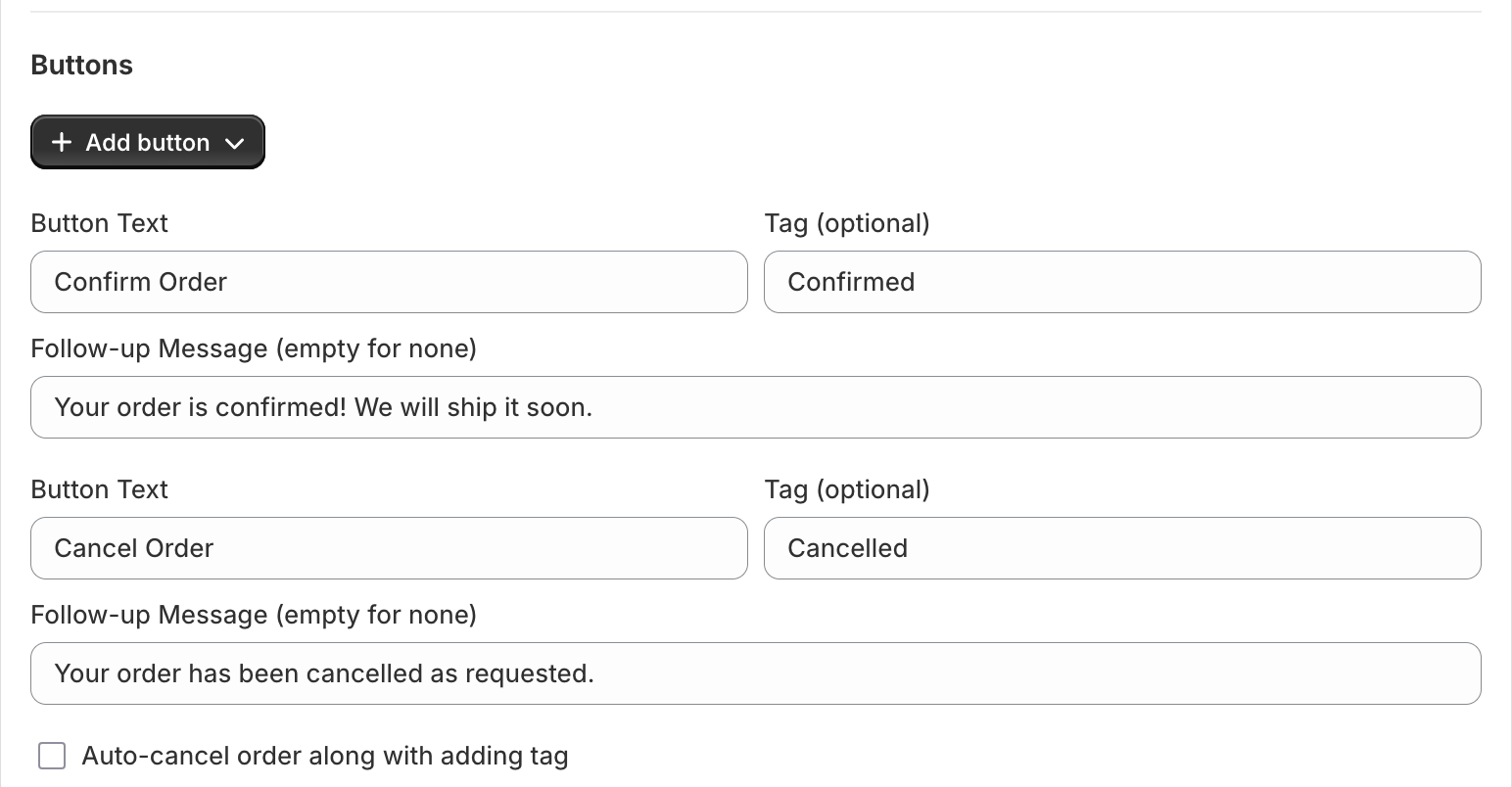
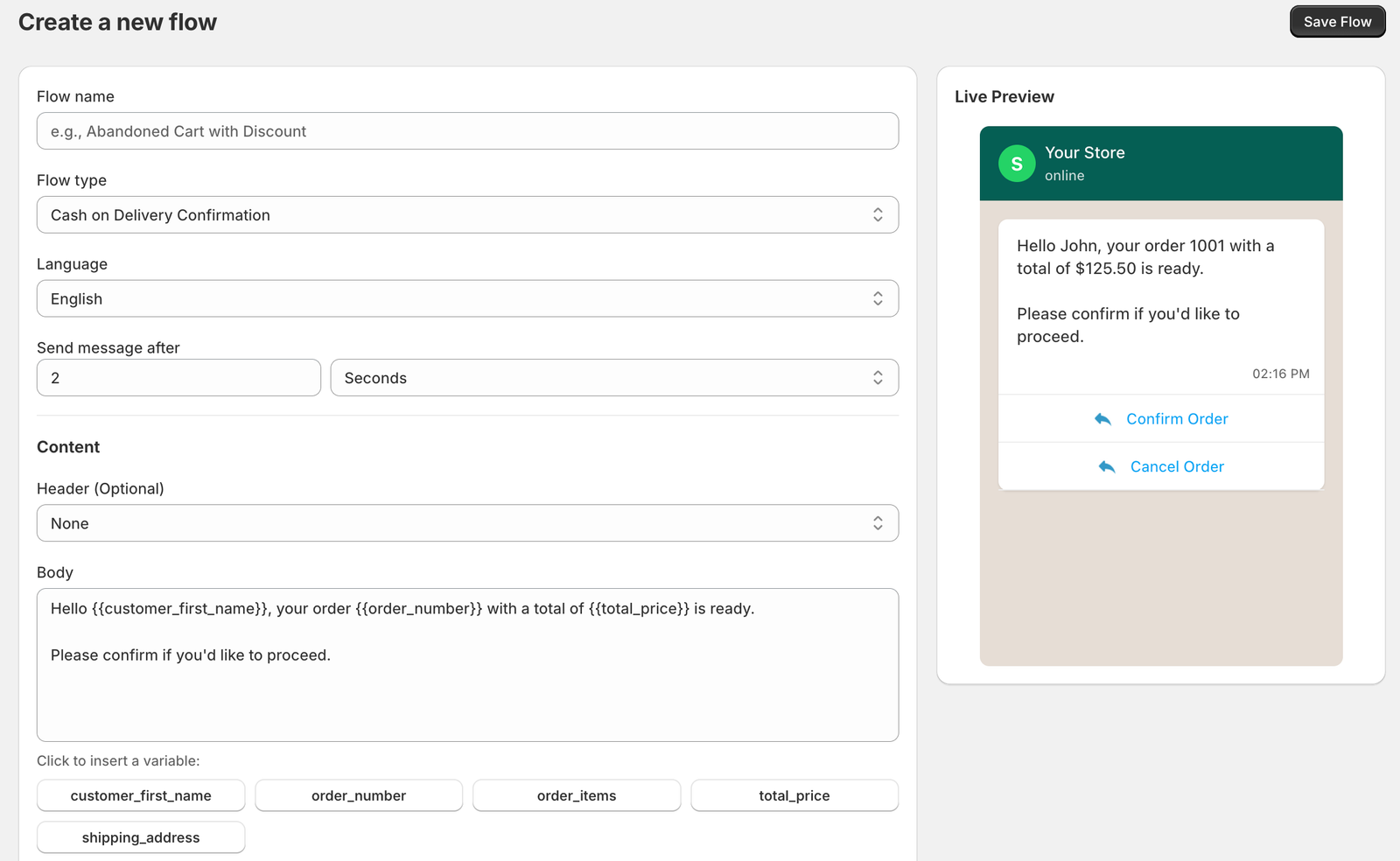
After the delay you set, Whapi sends the customer a WhatsApp message with the order number, the total and Confirm Order and Cancel Order buttons. - 4
The answer becomes a Shopify tag
When the customer taps a button, Whapi adds the tag you chose, such as Confirmed or Cancelled. The Cancel button can also cancel the order in Shopify. - 5
Whapi sends the shipping update
When you fulfill the order with tracking details, Whapi sends the tracking link. See courier tracking for Shopify.
Releasit, EasySell and WhatsApp confirmation: who does what
A COD form app handles the order form; Whapi handles WhatsApp after the order exists. Facts about the form apps come from their Shopify App Store listings, checked October 20, 2026.
| Job | COD form app (Releasit, EasySell) | Whapi |
|---|---|---|
| Order form on the product page instead of Shopify’s checkout | Yes, popup or embedded form | No |
| Upsells, bundles and quantity offers in the form | Yes | No |
| Phone check with a one-time code before ordering | Yes, OTP by SMS or WhatsApp | No |
| Blocking rules at the form | Releasit: postal-code limits and IP blocking. EasySell: blocking rules and IP blocking | No |
| Creates the order in Shopify | Yes | No, works from the order |
| Confirm or cancel after ordering, with buttons that tag the Shopify order | Releasit lists “confirm via SMS/WhatsApp”; check what your plan includes | Yes, Confirm and Cancel buttons with your own tags |
| Shipping update with the tracking link | Depends on the app; check its listing | Yes, from Shopify fulfillment and tracking data |
| Shared WhatsApp inbox for your team | Releasit lists none | Yes, Team Inbox on the Team plan |
| Message fees | Charged separately for optional SMS or WhatsApp messages | Paid to Meta directly at Meta’s rates, no markup |
Test one order: three checks for COD form apps
Form apps differ in how they save phone numbers, name the payment method and tag orders, and they change their settings over time. One test order through your own form shows you exactly what Whapi will see.
- 1
The phone number is on the order, with the country code
Open the test order in Shopify and look at the customer’s phone number. It should include the country code, such as +92, +966, +971 or +965. If the form saves numbers in local format, such as 0300 1234567, set a default country or a country code prefix in the form’s phone field, make the field required and label it “WhatsApp number”. - 2
The order shows cash on delivery and a pending payment
Shopify’s own manual method is called Cash on Delivery (COD), and orders paid with a manual method stay unpaid until you mark them as paid. Check that the form app’s order looks the same: cash on delivery as the payment method and payment pending. Then check that Whapi’s COD confirmation was sent for it. If the form app uses another payment name or marks the order as paid, contact Whapi support before you go live. - 3
Tags and messages don’t clash
Look at the tags on the test order. Form apps can add their own tags, and Whapi adds the tag you chose for each button. Use distinct names, such as WA-Confirmed and WA-Cancelled, so your fulfillment filter matches only the customer’s WhatsApp answer. If the form app also sends its own confirmation by SMS or WhatsApp, turn one of them off so the customer gets one message.
Notes for Releasit, EasySell and COD King
What matters for WhatsApp in each app, from its Shopify App Store listing and help center (checked October 20, 2026). Prices are as listed, in USD.
Releasit with WhatsApp confirmation
Releasit is rated 4.9 from 2,461 Shopify App Store reviews and has the Built for Shopify badge. Priced by monthly order volume: up to 60 orders at no charge, Premium $11.49/month, billed monthly, for up to 420.
Its listing shows OTP verification by SMS or WhatsApp, postal-code limits and IP blocking. SMS messages are optional and charged separately.
Abandoned form entries are saved as Shopify draft orders tagged abandoned_checkout_releasit_cod_form, not as abandoned checkouts, so Whapi’s abandoned checkout flow doesn’t pick them up.
EasySell with WhatsApp confirmation
EasySell is rated 4.9 from 992 Shopify App Store reviews. Priced by monthly order volume: up to 60 orders at no charge, PRO $9.95/month, billed monthly, for 440.
Its listing shows OTP by SMS or WhatsApp, smart blocking rules, IP blocking and partial COD deposits (ADVANCED, $24.95/month, billed monthly). SMS and WhatsApp messages are optional and charged separately.
If you turn on EasySell’s own WhatsApp messages, decide which app sends the order confirmation.
COD King and other form apps
COD King is rated 4.9 from 986 Shopify App Store reviews and has the Built for Shopify badge. Its listing pairs a COD form with its own SMS and WhatsApp confirmation messages.
If your form app already confirms orders on WhatsApp, use either its confirmation or Whapi’s, not both. Whapi can still send shipping updates and the other automations.
Whapi handles orders from any other form app the same way, as long as the app creates a normal Shopify order with the customer’s phone number. Test one order to be sure.
What confirming a COD form order costs
Each confirmation is one WhatsApp Utility message, charged by Meta per delivered message at the customer’s country rate. Whapi adds no markup. Rates for every country are on the WhatsApp API pricing page, and ready-to-use wording is on the COD confirmation templates page.
| Market | Utility rate per confirmation |
|---|---|
| Pakistan | $0.0150 |
| Saudi Arabia | $0.0107 |
| United Arab Emirates | $0.0157 |
| Kuwait | $0.0440 |
| Morocco | $0.0230 |
To cut fake orders further, combine the form app’s checks with confirmation, COD limits and partial prepayment. The guide on how to stop fake COD orders on Shopify explains each one.
COD form app questions
Whapi has no direct integration with Releasit. It works with the Shopify orders Releasit creates: when a customer orders through the Releasit COD form, Whapi can send the WhatsApp confirmation with Confirm and Cancel buttons and tag the Shopify order with the answer. Place one test order to check that the phone number is saved with its country code and that the order shows cash on delivery as the payment method.
Whapi has no direct integration with EasySell. It works from the Shopify order that EasySell creates, the same way it works with any COD form app, so it can send the WhatsApp confirmation and tag the order with the customer's answer. Check one test order for the phone number with its country code, cash on delivery as the payment method, and tags that don't clash with Whapi's. If EasySell's own WhatsApp or SMS confirmation is on, turn one of the two off so customers don't get two messages.
The most common causes are a phone number saved without a country code, a number that isn't on WhatsApp (Meta error 131026), an order that doesn't show cash on delivery as its payment method, a confirmation flow that is switched off, or a template Meta hasn't approved yet. Open the order in Shopify, check the phone number and payment method, then check the flow in Whapi.
Not always. OTP verification in a COD form checks that the phone number is real before the order is placed. WhatsApp confirmation asks the customer to confirm or cancel after ordering and records the answer as a Shopify tag. If fake numbers are rare in your store, WhatsApp confirmation alone may be enough; if they are common, keep OTP for high-risk orders, since every extra step at the form can cost orders.
Not through its abandoned checkout flow. Whapi's abandoned checkout recovery works from Shopify's abandoned checkouts. Releasit's help center says abandoned form entries are saved as Shopify draft orders tagged abandoned_checkout_releasit_cod_form, because apps can't create abandoned checkouts, so those entries are not abandoned checkouts and need a separate follow-up.
The same as any COD confirmation: one Utility message, charged by Meta per delivered message. On Meta's rate card effective October 1, 2026, that is $0.0150 in Pakistan, $0.0107 in Saudi Arabia and $0.0157 in the UAE, paid to Meta with no markup from Whapi. Form apps charge their own message fees separately for any OTP or SMS they send.
COD confirmation works on both plans: Pro at $18.99 per month and Team at $45 per month, each with a 7-day free trial. Orders from COD form apps are confirmed the same way as orders from Shopify's checkout.
Sources
- Shopify App Store: Releasit COD Form & Upsells (checked October 20, 2026)
- Shopify App Store: EasySell COD Form & Upsells (checked October 20, 2026)
- Shopify App Store: COD King (checked October 20, 2026)
- Releasit help center: How abandoned orders are processed as draft orders in Shopify (checked October 20, 2026)
- Shopify Help Center: Manual payment methods (checked October 20, 2026)
- Shopify Help Center: Editing the checkout form options (checked October 20, 2026)
- Meta: WhatsApp Business Platform pricing and rate cards (checked October 20, 2026)
Keep reading
- FeaturesWhatsApp Order Confirmation for ShopifyConfirm new Shopify orders on WhatsApp before you ship. Customers tap Confirm or Cancel, and Whapi tags the order in Shopify and sends the follow-up.Read
- TemplatesCOD Order Confirmation WhatsApp Message TemplatesWhatsApp templates that ask cash on delivery customers to confirm or cancel, with buttons, Shopify variables and follow-ups for each reply.Read
- CompareBest COD Confirmation Apps for Shopify (2026)COD order confirmation apps for Shopify compared: WhatsApp, SMS and call-based options, pricing, and which fits your store. Written by Whapi.Read
- HelpWhatsApp Error 131026: Message Undeliverable (Fix)Error 131026 means a WhatsApp message could not be delivered to the number. Common causes, what you can check and when to stop retrying.Read
- BlogHow to Stop Fake COD Orders on Shopify: 7 FixesSeven ways to reduce fake and refused cash on delivery orders on Shopify, from order confirmation and COD limits to partial prepayment.Read
- ProductWhapi Setup Guide: Connect WhatsApp to ShopifyStep-by-step setup: install Whapi, connect your WhatsApp Business number through Meta, add a payment method and turn on your first automations.Read
Confirm your COD form orders on WhatsApp.
Join 5,000+ merchants using Whapi. Install it from the Shopify App Store, connect your WhatsApp Business number and turn on your first automation in minutes. Every plan starts with a 7-day free trial.