WhatsApp features for Shopify: every Whapi automation in one place
Whapi, a Shopify app for WhatsApp automation, recovers abandoned checkouts, confirms orders, sends shipping updates and back in stock alerts, and runs your WhatsApp chats and campaigns from one place. Below is every feature, what starts it, which plan includes it and how Meta charges for its messages.
Used by 5,000+ merchantsRated 5 stars by 39 merchants7-day free trialBuilt for Shopify
The short answer
- Whapi’s Pro plan ($18.99/month) includes every automation: abandoned checkout recovery, order confirmation, shipping updates, back in stock alerts, review requests, campaigns with a newsletter signup, and a WhatsApp chat button and popup.
- Whapi’s Team plan ($45/month) adds multiple WhatsApp accounts, a shared inbox for unlimited agents, automatic assignment, agent performance metrics and AI conversation labels.
- Every Whapi message goes through Meta’s official WhatsApp Business API from the store’s own number, and the store can keep the WhatsApp Business App on that number with coexistence.
- In Whapi, WhatsApp button replies can add tags to the Shopify order, so a team can filter confirmed and cancelled orders.
- Meta charges per delivered message by category: order updates are usually Utility, and cart reminders and campaigns are Marketing. Whapi adds no markup, and both plans start with a 7-day free trial.
WhatsApp messages that win back lost sales
These flows reach shoppers who left checkout, wanted a product that was sold out, or would rather order in a chat. Meta’s template guide gives a cart reminder as an example of a Marketing message, which costs more per message than an order update, so timing and relevance matter.
Shoppers who reach checkout and leave get a WhatsApp reminder after the delay you choose, with a link back to their saved checkout. You can add a discount code and see the orders and revenue each flow brings back.
- Starts when
- A checkout is left unfinished
- Plans
- Pro and Team
- Meta category
- Marketing
A signup button on sold-out products lets shoppers ask to hear about restocks on WhatsApp. When the product is available again, each subscriber gets a message with a link to buy it.
- Starts when
- A product the shopper subscribed to is restocked
- Plans
- Pro and Team
- Meta category
- Marketing
Customers describe what they want in a WhatsApp chat. The AI searches your Shopify catalog, answers their questions, confirms the details and takes the order, so people who prefer to chat can buy without visiting your store.
- Starts when
- A customer messages your WhatsApp number
- Plans
- Not on the Shopify plan cards yet. Ask us about access.
- Meta category
- Service (replies inside an open chat)
Automations that run on every Shopify order
These flows start from a Shopify order event and keep the customer informed until the parcel arrives. Order confirmations and shipping updates are usually Utility messages, which Meta prices below Marketing in every market on its current rate card.
New orders get a WhatsApp message with Confirm Order and Cancel Order buttons. The answer becomes a tag on the Shopify order, and Whapi can cancel the order in Shopify when the customer taps Cancel.
- Starts when
- An order is placed, after the delay you set
- Plans
- Pro and Team
- Meta category
- Utility
Fulfill an order in Shopify with a tracking number, and the customer gets a WhatsApp message with the tracking link. Any courier, 3PL or shipping app that adds tracking to the Shopify order works.
- Starts when
- An order is fulfilled with tracking
- Plans
- Pro and Team
- Meta category
- Utility
After Shopify marks an order fulfilled or delivered, Whapi waits the delay you set, then asks the customer on WhatsApp to review what they bought, with a direct link to the review page you choose.
- Starts when
- The delay you set after delivery
- Plans
- Pro and Team
- Meta category
- Marketing
Chat, campaigns and your team on one WhatsApp number
Shoppers can start a chat from your store, you can send campaigns to customers who opted in, and on Team your whole support team answers from one shared inbox.
A newsletter signup widget and popup on your store collect WhatsApp opt-ins. You then schedule campaigns to segments built from Shopify customer data, such as a product launch or a sale.
- Starts when
- You schedule a campaign
- Plans
- Pro and Team
- Meta category
- Marketing
A WhatsApp chat button and popup on your storefront let shoppers message you in one tap. You choose the placement, the text and the opening message.
- Starts when
- A shopper taps the button
- Plans
- Pro and Team
- Meta category
- Customer messages are free; your replies are Service
Your whole support team answers customers from one shared WhatsApp inbox, with no limit on agents. Whapi assigns conversations automatically, shows each customer’s Shopify orders beside the chat, and adds AI conversation labels and per-agent performance metrics.
- Starts when
- A customer writes or replies to you
- Plans
- Team only
- Meta category
- Service (first 1,000 a month free per number)
Your own number on the official WhatsApp Business API
Whapi connects to your own WhatsApp Business account through Meta’s sign-up popup, so Meta bills you directly and the number stays in your business portfolio.
Whapi sends every message through Meta’s WhatsApp Cloud API from a number in your own WhatsApp Business account. Meta charges that account its published per-message rate, and Whapi adds no markup.
- Plans
- Pro and Team
- Message limit
- None from Whapi; Meta’s own messaging limits apply
Keep using the WhatsApp Business App on your phone with the same number Whapi automates. You chat by hand from the app while flows run through the API.
- Plans
- Pro and Team
- Set up
- Choose “Connect a WhatsApp Business app” in Meta’s popup
Whapi is listed in Claude’s connector directory. Ask Claude how much revenue your flows brought in, why messages failed, or to create an abandoned cart reminder. Claude asks you to confirm before it creates, changes or deletes anything.
- Plans
- Pro and Team; Team can also search inbox conversations
- Find it
- Claude > Customize > Connectors, search “Whapi” (18 tools)
Built into every flow: templates, buttons, tags and reports
Each automated message in Whapi is a flow you build the same way: write the template, add buttons and tags, and track the result. These are real screens from the Whapi app.
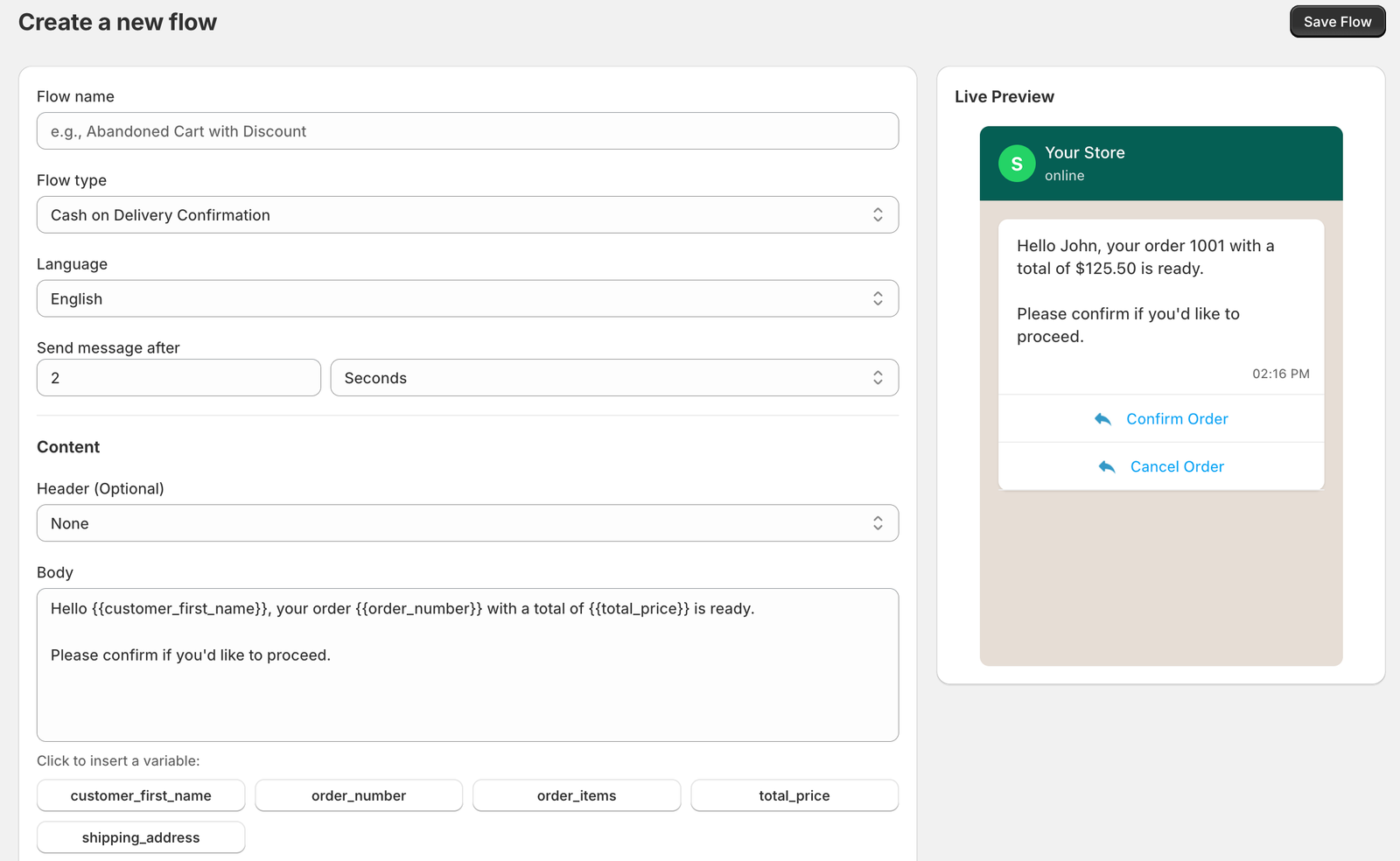
Flow builder with a live preview
Pick the flow type, language and send delay, then write the message with Shopify variables such as {{customer_first_name}}, {{order_number}}, {{order_items}}, {{total_price}} and {{shipping_address}}. The preview shows the exact WhatsApp message.
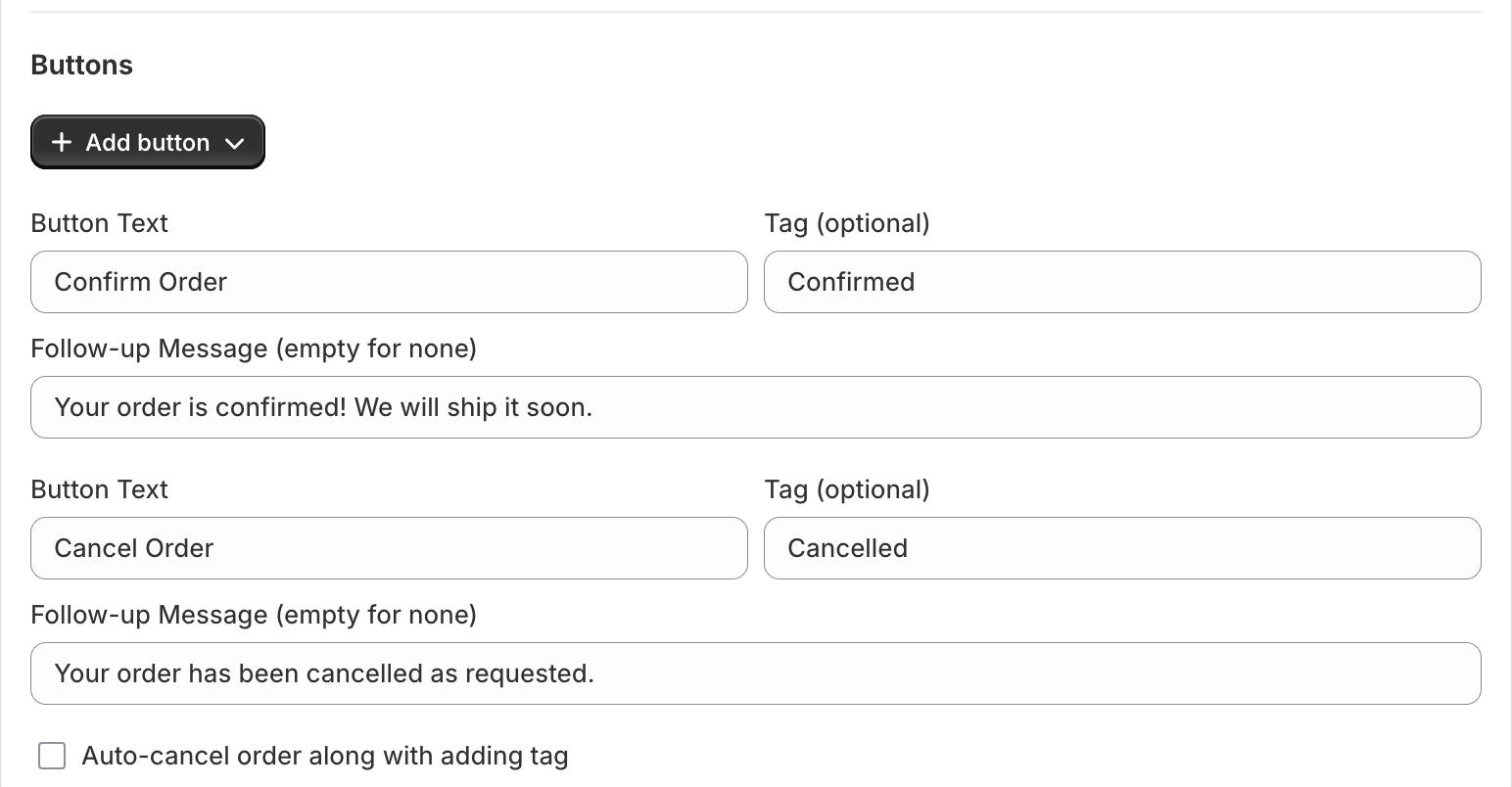
Buttons that tag Shopify orders
Give each reply button a Shopify order tag and a follow-up message. On an order confirmation flow, Whapi can also cancel the order in Shopify when the customer taps Cancel.
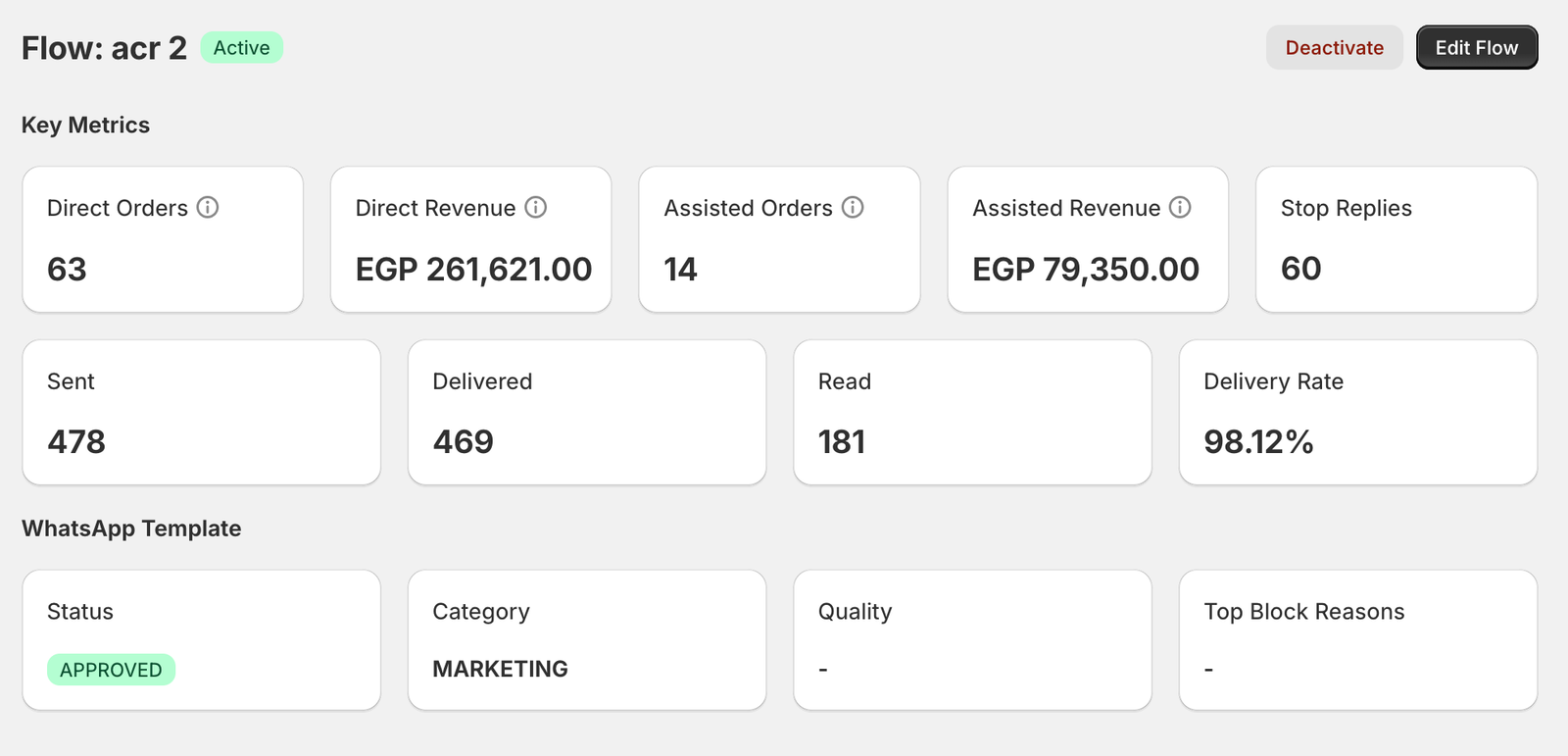
A report for every flow
See messages sent, delivered and read, the delivery rate, orders and revenue the flow drove, stop replies, and the template’s Meta status, category and quality.
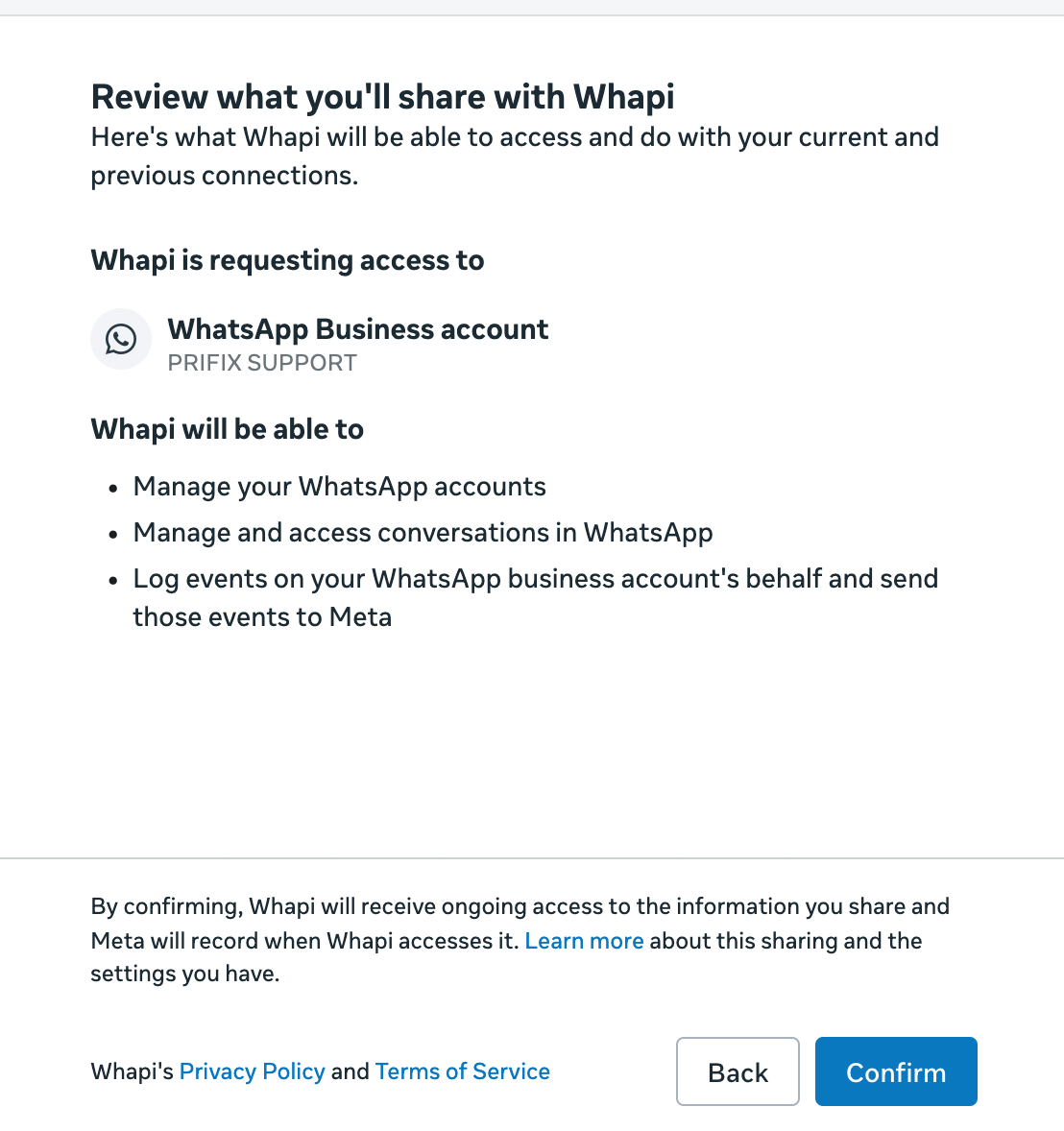
Connected through Meta, approved by you
You connect WhatsApp in Meta’s own popup and see exactly what Whapi will be able to access before you confirm.
Which WhatsApp Shopify features are on Pro and Team
Pro includes every automation. Team adds five tools for support teams: multiple WhatsApp accounts, a shared inbox for unlimited agents, automatic assignment, agent performance metrics and AI conversation labels. Prices and billing details are on the Whapi pricing page.
| Compare features | Pro | Team |
|---|---|---|
| Automations | ||
| Abandoned checkout recovery | ||
| Order confirmation | ||
| Shipping updates with tracking links | ||
| Back in stock alerts | ||
| Review requests | ||
| WhatsApp campaigns and newsletter signup | ||
| WhatsApp chat button and popup | ||
| Custom templates and automatic order tags | ||
| WhatsApp number | ||
| Your own official WhatsApp API number | ||
| Multiple WhatsApp accounts | ||
| Connect the WhatsApp Business App (coexistence) | ||
| Message limit from Whapi | None | None |
| Meta message fees | Paid to Meta, no markup | Paid to Meta, no markup |
| Support team | ||
| Shared inbox | Unlimited agents | |
| Automatic conversation assignment | ||
| Agent performance metrics | ||
| AI conversation labels | ||
| Price | ||
| Monthly | $18.99 | $45 |
| Yearly | $149 (save 35%) | $299 (save 45%) |
| Free trial | 7 days | 7 days |
| Automations | |
|---|---|
| Abandoned checkout recovery | |
| Order confirmation | |
| Shipping updates with tracking links | |
| Back in stock alerts | |
| Review requests | |
| WhatsApp campaigns and newsletter signup | |
| WhatsApp chat button and popup | |
| Custom templates and automatic order tags | |
| WhatsApp number | |
| Your own official WhatsApp API number | |
| Multiple WhatsApp accounts | |
| Connect the WhatsApp Business App (coexistence) | |
| Message limit from Whapi | None |
| Meta message fees | Paid to Meta, no markup |
| Support team | |
| Shared inbox | |
| Automatic conversation assignment | |
| Agent performance metrics | |
| AI conversation labels | |
| Price | |
| Monthly | $18.99 |
| Yearly | $149 (save 35%) |
| Free trial | 7 days |
| Automations | |
|---|---|
| Abandoned checkout recovery | |
| Order confirmation | |
| Shipping updates with tracking links | |
| Back in stock alerts | |
| Review requests | |
| WhatsApp campaigns and newsletter signup | |
| WhatsApp chat button and popup | |
| Custom templates and automatic order tags | |
| WhatsApp number | |
| Your own official WhatsApp API number | |
| Multiple WhatsApp accounts | |
| Connect the WhatsApp Business App (coexistence) | |
| Message limit from Whapi | None |
| Meta message fees | Paid to Meta, no markup |
| Support team | |
| Shared inbox | Unlimited agents |
| Automatic conversation assignment | |
| Agent performance metrics | |
| AI conversation labels | |
| Price | |
| Monthly | $45 |
| Yearly | $299 (save 45%) |
| Free trial | 7 days |
Which Meta message category each feature uses
Meta puts every template in a category when it reviews it, and the category sets the price. Order updates are Utility; cart reminders, back in stock alerts, review requests and campaigns are Marketing; and replies inside an open chat are Service.
| Meta category | Whapi features | How Meta charges |
|---|---|---|
| Utility | Order confirmation, shipping updates | Per delivered message, for example $0.0550 in Germany, $0.0220 in the United Kingdom and $0.0034 in the United States. Charged even inside an open 24-hour chat. |
| Marketing | Abandoned checkout reminders, back in stock alerts, review requests, campaigns | Per delivered message, for example $0.1365 in Germany, $0.0635 in the United Kingdom and $0.0250 in the United States. |
| Service | Replies sent through the API inside an open 24-hour chat, such as team inbox or AI order taking replies | First 1,000 a month free per number, then the Utility rate. |
| Customer messages | Anything a customer sends to your number | Free |
Questions about Whapi features
What features does Whapi have for Shopify stores?
Whapi automates WhatsApp messages for Shopify stores: abandoned checkout recovery, order confirmation, shipping updates with tracking links, back in stock alerts, review requests, campaigns with a newsletter signup widget, and a WhatsApp chat button and popup. The Team plan adds a shared inbox for unlimited agents. Every message goes through Meta's official WhatsApp Business API from the store's own number, and the store can keep using the WhatsApp Business App on that number (coexistence).
Which Whapi features are only on the Team plan?
Five Whapi features are only on the Team plan ($45 per month or $299 per year): multiple WhatsApp accounts, a shared inbox for unlimited agents, automatic conversation assignment, agent performance metrics and AI conversation labels. Every automation, including cart recovery, order confirmation, shipping updates, back in stock alerts, review requests, campaigns and the chat button, is already on Pro ($18.99 per month).
Are there WhatsApp shared inbox tools that don't charge per-agent seat fees?
Yes. Whapi's Team plan costs a flat $45 per month, or $299 per year, for a shared WhatsApp inbox with unlimited agents, automatic conversation assignment, agent performance metrics and AI conversation labels. There is no extra charge per agent. Meta's WhatsApp message fees are billed separately by Meta, and the first 1,000 service replies per number each month are free.
How do I automatically send WhatsApp shipping updates when an order ships?
Install Whapi from the Shopify App Store, connect your WhatsApp Business number and turn on a shipping update flow. From then on, when you fulfill an order in Shopify and add a tracking number, Whapi sends the customer a WhatsApp message with the tracking link. It works with any courier, 3PL or shipping app that adds tracking to the Shopify order, and it is included on both Pro and Team.
Can I customize the WhatsApp message templates?
Yes. In Whapi's flow builder you write the message, choose its language, add an optional header and insert Shopify variables such as the customer's first name, order number, order items, total price and shipping address, with a live WhatsApp preview. You can add reply buttons, and each button can add a Shopify order tag and send its own follow-up message. Meta reviews every new template before it can be sent.
Which Whapi messages does Meta charge for?
Meta charges for each delivered template message, at a rate set by the category and the customer's country. Order confirmations and shipping updates are usually Utility messages ($0.0550 in Germany, $0.0220 in the United Kingdom and $0.0034 in the United States on Meta's rate card effective October 1, 2026). Cart reminders, back in stock alerts, review requests and campaigns are Marketing messages ($0.1365 in Germany, $0.0635 in the United Kingdom and $0.0250 in the United States). Replies inside an open 24-hour chat are Service messages, with the first 1,000 a month free per number. Messages customers send you are free. Whapi adds no markup.
Can I use my existing WhatsApp number with Whapi?
Yes. Whapi connects the number you already use, through Meta's sign-up popup, and Meta bills message fees to your own WhatsApp Business account. A number that runs on the WhatsApp Business App can stay on your phone with coexistence, so you keep chatting by hand while Whapi sends the automated messages. A WhatsApp number can only be connected to one API provider at a time, so a number that is on another provider has to be disconnected there before you connect it to Whapi.
Can I manage Whapi from Claude?
Yes. Whapi is listed in Claude's connector directory: in Claude, open Customize > Connectors and search for Whapi. Once connected, you can ask Claude how much revenue your flows and campaigns brought in, how they performed, why messages failed or which flows are waiting for Meta approval. On Pro and Team it can also create flows and campaigns, turn flows on or off, and pause or cancel campaigns. On Team it can search your shared inbox. Claude asks you to confirm before it changes anything.
Do I need a developer to set up Whapi features?
No. Whapi runs inside your Shopify admin, and you build each flow in a form: pick the flow type, language and delay, write the message with Shopify variables, add buttons and tags, and save. WhatsApp is connected in Meta’s own sign-up popup, so there is no code, server or webhook for you to set up. Meta reviews each new template before Whapi can send it.
Sources
- Meta: Template categorization guidelines (checked October 20, 2026)
- Meta: Pricing on the WhatsApp Business Platform (checked October 20, 2026)
- Whapi on the Shopify App Store (plans and features) (checked October 20, 2026)
Keep reading
- ProductWhapi Pricing: Pro $18.99/mo, Team $45/mo, 7-Day TrialWhapi costs $18.99/month for Pro or $45/month for Team, with a 7-day free trial. WhatsApp message fees are paid to Meta directly with no markup.Read
- ProductHow Whapi Works: WhatsApp Automation for ShopifyHow Whapi connects your Shopify store to the official WhatsApp Business API, sends automated messages and tags orders based on customer replies.Read
- TemplatesWhatsApp Utility vs Marketing Templates: Rules & CostHow Meta decides if a WhatsApp template is utility, marketing or authentication, why it matters for cost, and how to avoid recategorization.Read
- ProductWhapi FAQs: WhatsApp Automation for ShopifyAnswers about Whapi plans, Meta message fees, setup, coexistence, automations, templates, data privacy and support.Read
Turn on your first WhatsApp automation this week.
Join 5,000+ merchants using Whapi. Install it from the Shopify App Store, connect your WhatsApp Business number and turn on your first automation in minutes. Every plan starts with a 7-day free trial.